My Subscriptions
This guide walks you through the features of My Subscriptions, where you can manage your active API subscriptions.
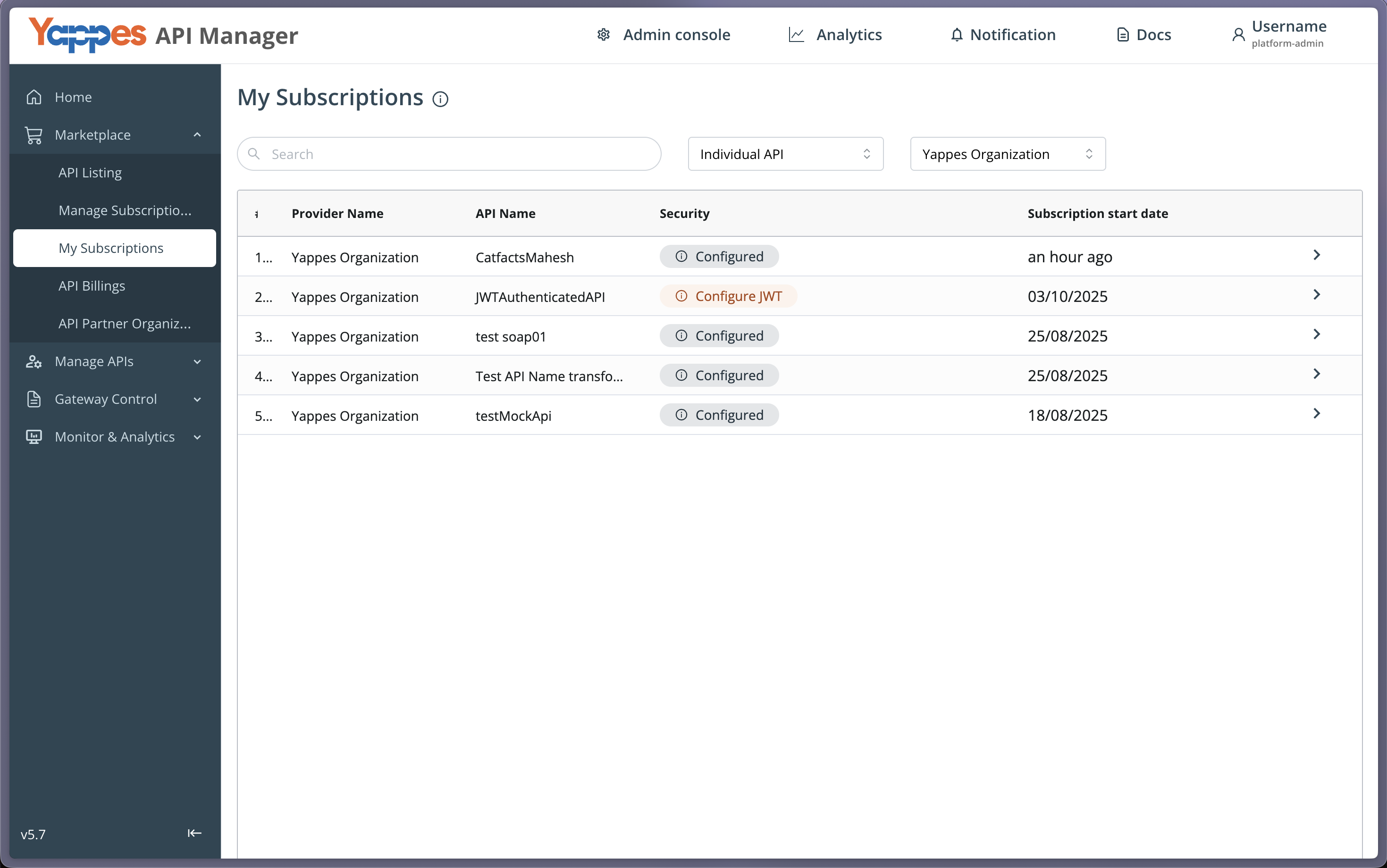
My subscription allows you to manage your active API subscriptions. You can view plan details, filter subscriptions by individual and group APIs and organizations, select API environment, copy/reset keys, access sample requests, and download API documents.
My Subscription features
- View your API subscription details.
- Select API Environment.
- Rate and provide feedback on APIs.
- Access public and private API keys.
- Download API documentation.
Subscription Details
-
View Rate Plan / Subscription Details: You can view the rate plan and subscription details for each deal, including cost, duration, API keys, environments, and more. See Rate Plans for how providers configure pricing. -
Filter subscriptions: You can filter your subscriptions based on individual and group APIs and organizations. This makes it easier to manage your subscriptions and find the ones you're interested in.
-
mTLS Enabled: On the subscriptions list, this column showsYeswhen client certificates are present for the subscription, andNootherwise.
Rate APIs
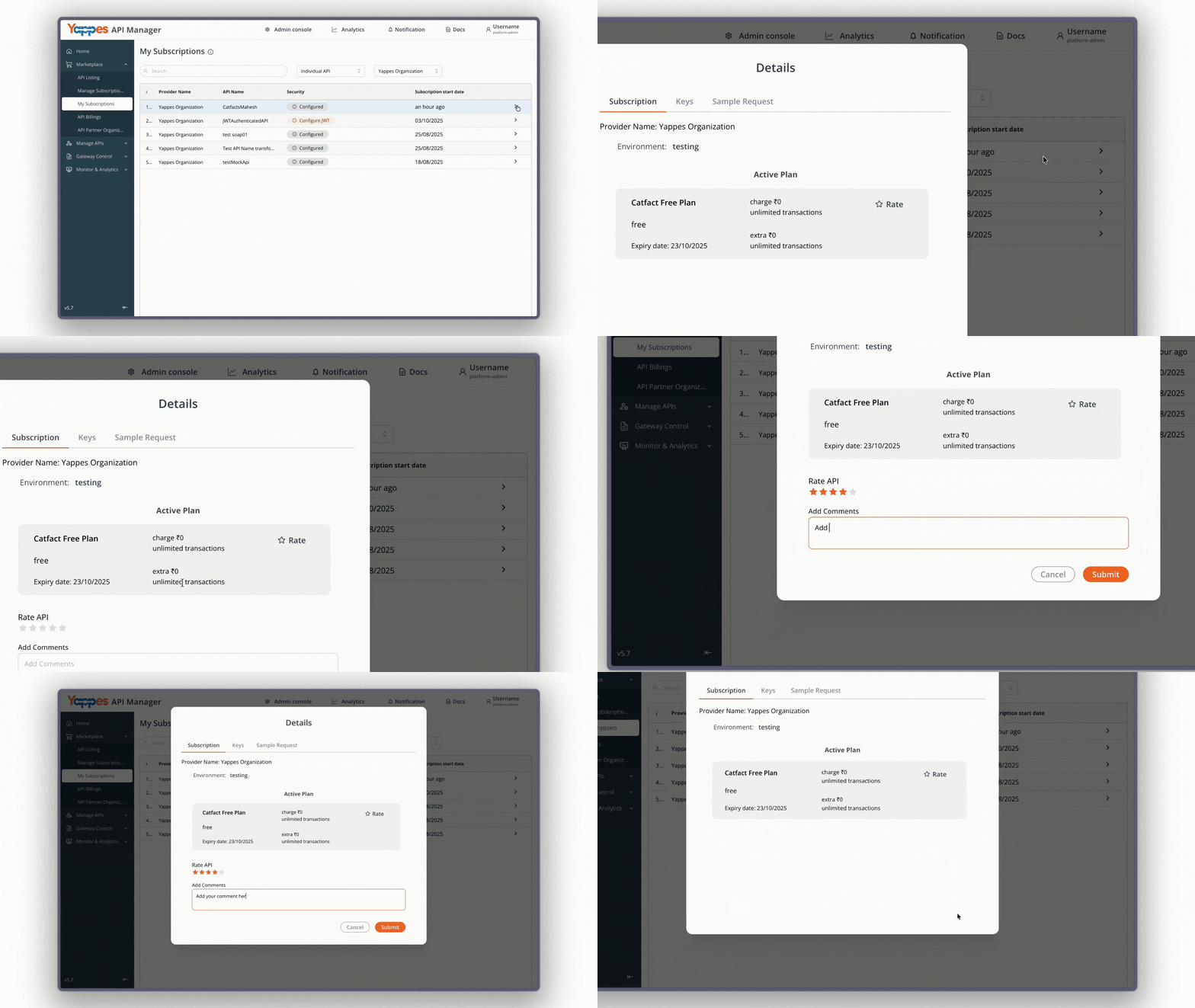
You can give feedback for the APIs that are available to you. This lets you share your thoughts, opinions, and suggestions to make the APIs better and improve the user experience.
Copy API Keys
You can copy the public and private keys for each subscription.

View Sample Request
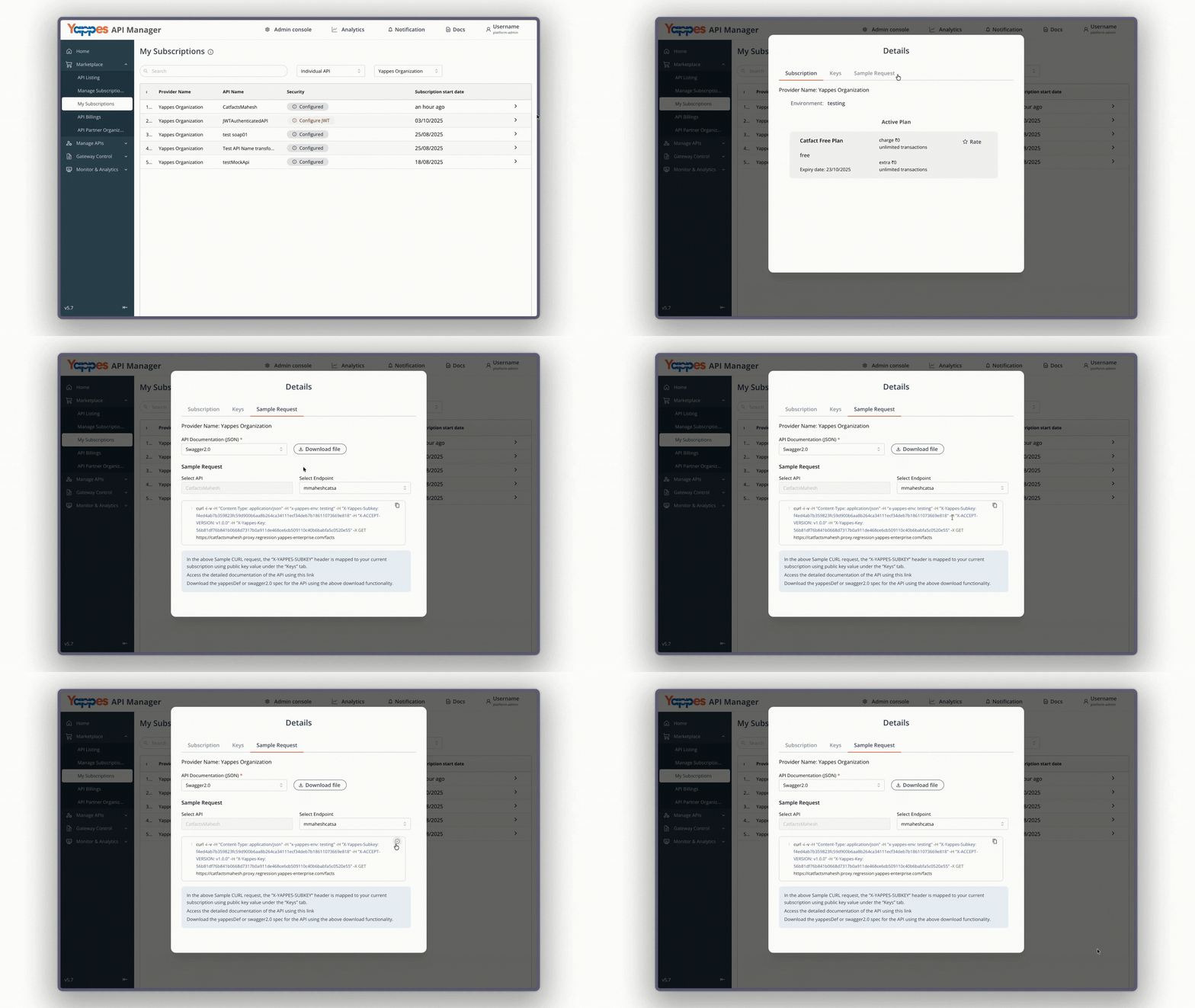
Each subscription will have a link to view a sample request. This can help you understand how to make requests to the API. If the API Subscription has multiple endpoints or APIs, then you can switch between them.
Security Configuration
Open a subscription’s detail view and go to the Security tab to review or configure security settings for that subscription.
Yappes OAuth
If Yappes OAuth is enabled for your subscription, open the Security tab to view read-only credentials:
| Field | Description |
|---|---|
| Access Token URL | Platform token endpoint |
| Refresh Token URL | Platform refresh endpoint |
| Client ID | Application client identifier |
| Client Secret | Application client secret |
Use the copy buttons to copy each value. For manual token requests and the full consumer flow, see Yappes OAuth.
On the Sample Request tab, Yappes OAuth subscriptions automatically fetch a Bearer token using the client_credentials grant and inject it into the sample cURL command.
JWT (JSON Web Token) Authentication
If JWT (JSON Web Token) Authentication is enabled for your API, configure JWT claims under the Security tab of your subscription.
Steps to configure JWT claims
- Select the API for which you want to configure JWT.
- (For group-level subscriptions only) you can enable
Same JWT claims for all APIsif you want to apply the same token across multiple APIs in the group. - Enter your JWT Claims in JSON format, for example:
{
  "userType": "internal",
  "role": "admin"
}
- Click
Updateto save your security configuration.
Note
- If JWT is enabled and not configured, requests will fail until claims are updated.
- Claims can be customized based on API requirements (for example, roles, permissions, metadata).
- For group-level subscriptions, you can apply the same JWT claim across all APIs in the group, or define different claims for each API.
mTLS
When mTLS Enabled is Yes on the subscriptions list, open the subscription and go to the Security tab. For individual (non-group) subscriptions, an mTLS section appears with a read-only Certificates attached list of the uploaded client certificate, security key, and trusted CA certificate. Click a certificate name to download it.
Note
The individual mTLS certificate block is shown only when mTLS is enabled and the subscription is not a group subscription. Group subscriptions do not show this block on the Security tab.
API Documentation Downloads
You can download the API documentation for each subscription. The documentation provides comprehensive details about the API, including available operations or endpoints, required inputs, and expected responses.
-
For REST APIs: Documentation is available in JSON format, supporting both:
Swagger 2.0YappesDef
-
For SOAP APIs: Documentation is available in WSDL format, supporting:
SOAPoperations
You can see a sample REST API documentation in Swagger 2.0 JSON below:
{
 "apiName": "dell",
 "apiDefinition": {
   "info": {
     "title": "dell",
     "description": "Test",
     "version": "0.0.0",
     "termsOfService": "asdfg",
     "contact": {
       "email": ""
     },
     "license": {
       "name": "dell",
       "url": "https://yappes.com/"
     }
   },
   "schemes": [
     "https"
   ],
   "basePath": "/",
   "definitions": {
     "result": {
       "type": "object",
       "default": "{ \"key\" : \"value\"}",
       "properties": {
         "key": {
           "type": "string"
         }
       }
     }
   },
   "tags": [
     {
       "name": "john"
     }
   ],
   "paths": {
     "/post": {
       "get": {
         "description": "test",
         "consumes": [
           "application/json"
         ],
         "produces": [
           "application/json"
         ],
         "parameters": "",
         "responses": {
           "200": {
             "description": "successful operation",
             "schema": {
               "$ref": "#/definitions/result"
             }
           }
         },
         "security": [
           {
             "yappes-auth-key": [],
             "yappes-subscription-key": []
           }
         ]
       }
     }
   },
   "host": "yappes-enterprise.com",
   "swagger": "2.0",
   "externalDocs": {
     "description": "",
     "url": "https://yappes-enterprise.com"
   },
   "security": [
     {
       "yappes-auth-key": [],
       "yappes-subscription-key": []
     }
   ],
   "securityDefinitions": {
     "yappes-auth-key": {
       "type": "apiKey",
       "name": "x-yappes-key",
       "in": "header"
     },
     "yappes-subscription-key": {
       "type": "apiKey",
       "name": "x-yappes-subkey",
       "in": "header"
     }
   }
 }
}
You can see a sample SOAP API documentation in WSDL format below:
<?xml version="1.0" encoding="UTF-8"?>
<definitions xmlns="http://schemas.xmlsoap.org/wsdl/"
             xmlns:soap="http://schemas.xmlsoap.org/wsdl/soap/"
             xmlns:tns="http://calculatorapi.proxy.regression.yappes-enterprise.com/calculator.asmxwsdl"
             xmlns:xsd="http://www.w3.org/2001/XMLSchema"
             name="CalculatorAPI"
             targetNamespace="http://calculatorapi.proxy.regression.yappes-enterprise.com/calculator.asmxwsdl">
  <types>
    <xsd:schema targetNamespace="http://calculatorapi.proxy.regression.yappes-enterprise.com/calculator.asmxwsdl">
      <xsd:element name="Add operationRequest"><xsd:complexType><xsd:sequence><xsd:element name="calculatorsoap" type="xsd:string" minOccurs="1"/></xsd:sequence></xsd:complexType></xsd:element><xsd:element name="Add operationResponse"><xsd:complexType><xsd:sequence><xsd:element name="result" type="xsd:string"/></xsd:sequence></xsd:complexType></xsd:element>
    </xsd:schema>
  </types>

  <message name="Add operationRequest"><part name="parameters" element="tns:Add operationRequest"/></message><message name="Add operationResponse"><part name="parameters" element="tns:Add operationResponse"/></message>

  <portType name="CalculatorAPIPortType">
    <operation name="Add operation"><input message="tns:Add operationRequest"/><output message="tns:Add operationResponse"/></operation>
  </portType>

  <binding name="CalculatorAPIBinding" type="tns:CalculatorAPIPortType">
    <soap:binding style="document" transport="http://schemas.xmlsoap.org/soap/http"/>
    <operation name="Add operation"><soap:operation soapAction="Add operation" /><input><soap:body use="literal"/></input><output><soap:body use="literal"/></output></operation>
  </binding>

  <service name="CalculatorAPI">
    <documentation>Auto-generated service</documentation>
    <port name="CalculatorAPIPort" binding="tns:CalculatorAPIBinding">
      <soap:address location="http://calculatorapi.proxy.regression.yappes-enterprise.com/calculator.asmxwsdl"/>
    </port>
  </service>
</definitions>