Schema Validation
Overview
Schema Validation in Yappes enforces strict JSON and XML request payload structures at the API Gateway before requests are forwarded to backend services.
This feature helps organizations to:
- Prevent malformed or malicious payloads
- Enforce API contracts consistently
- Eliminate schema drift across integrations
- Improve backend reliability and data quality
Schema Validation aligns with industry standards such as JSON Schema, XML Schema Definition (XSD), and OWASP API Security best practices.
When to Use Schema Validation
Use Schema Validation when:
- APIs require a well-defined request payload structure
- Payload formats and data types must be strictly enforced
- Backend systems must be protected from invalid or unexpected data
- Multiple consumers integrate with the same API
- Compliance or governance requirements mandate contract enforcement
When Not to Use Schema Validation
Avoid using Schema Validation in the following scenarios:
- APIs accept highly dynamic or free-form payloads
- Payload structure varies significantly across consumers
- Schemas are not finalized during early development or prototyping
Info
For lightweight validation, consider using Verify Headers policies instead.
Prerequisites
Before configuring Schema Validation policies, ensure the following requirements are met.
Required Access and Permissions
Common Requirements
- Active Yappes platform account.
API Manageraccess.- Permission to create and manage Gateway Policies.
System Requirements
- Supported web browser:
Chrome,Edge, orFirefox.
Schema Ruleset Configuration
This section explains how to define validation rules within the schema editor.
Ruleset Concept
A ruleset is a map of field names to validation rules.
Each rule must define:
- type – Data type of the field
- isMandatory – Whether the field is required
Optional constraints depend on the rule type.
Supported Rule Types
- string
- number
- boolean
- object
- array
String Ruleset
Used to validate string values with optional length and pattern constraints.
Supported Properties
| Property | Required / Optional | Description | What can be entered | Example |
|---|---|---|---|---|
type |
Required | Defines the data type | Must be "string" |
"string" |
isMandatory |
Required | Indicates whether the field is mandatory | true or false |
true |
min |
Optional | Minimum allowed string length | Integer ≥ 0 | 3 |
max |
Optional | Maximum allowed string length | Integer ≥ 0 | 20 |
regex |
Optional | Regular expression to validate string format | Valid regex pattern | "^[a-zA-Z0-9_]+$" |
description |
Optional | Human-readable description of the field | Any string | "Unique username" |
Example
{
  "username": {
    "type": "string",
    "isMandatory": true,
    "min": 3,
    "max": 20,
    "regex": "^[a-zA-Z0-9_]+$"
  }
}
Number Ruleset
The Number ruleset is used to validate numeric values in request payload. It supports optional range constraints to ensure numeric values fall within acceptable limits.
Supported Properties
| Property | Required / Optional | Description | What can be entered | Example |
|---|---|---|---|---|
type |
Required | Defines the data type | Must be "number" |
"number" |
isMandatory |
Required | Indicates whether the field is mandatory | true or false |
true |
min |
Optional | Minimum allowed numeric value | Any valid number | 18 |
max |
Optional | Maximum allowed numeric value | Any valid number | 65 |
description |
Optional | Human-readable description of the field | Any string | "User age in years" |
Example
{
  "age": {
    "type": "number",
    "isMandatory": true,
    "min": 18,
    "max": 65,
    "description": "User age in years"
  }
}
Boolean Ruleset
The Boolean ruleset is used to validate boolean values (true or false) in request payload.
Boolean rules are intentionally simple and do not support range, length, or pattern-based constraints.
Supported Properties
| Property | Required / Optional | Description | What can be entered | Example |
|---|---|---|---|---|
type |
Required | Defines the data type | Must be "boolean" |
"boolean" |
isMandatory |
Required | Indicates whether the field is mandatory | true or false |
true |
description |
Optional | Human-readable description of the field | Any string | "Indicates whether the user is active" |
Example
{
  "isActive": {
    "type": "boolean",
    "isMandatory": true,
    "description": "Indicates whether the user is active"
  }
}
Object Ruleset
The Object ruleset is used to validate structured JSON objects in request payload. It supports nested and recursive validation by defining validation rules for object properties using child rulesets.
Supported Properties
| Property | Required / Optional | Description | What can be entered | Example |
|---|---|---|---|---|
type |
Required | Defines the data type | Must be "object" |
"object" |
isMandatory |
Required | Indicates whether the field is mandatory | true or false |
true |
properties |
Required | Defines validation rules for object fields | A valid ruleset object | { "id": { "type": "number", "isMandatory": true } } |
description |
Optional | Human-readable description of the field | Any string | "User root object" |
Example
{
  "user": {
    "type": "object",
    "isMandatory": true,
    "description": "User root object",
    "properties": {
      "id": {
        "type": "number",
        "isMandatory": true
      },
      "name": {
        "type": "string",
        "isMandatory": true
      },
      "emailVerified": {
        "type": "boolean",
        "isMandatory": false
      }
    }
  }
}
Array Ruleset
The Array ruleset is used to validate array values in request payload.
Each array defines validation rules for its elements using the items property.
Arrays support recursive validation and can contain primitive values, objects, or nested arrays.
Supported Properties
| Property | Required / Optional | Description | What can be entered | Example |
|---|---|---|---|---|
type |
Required | Defines the data type | Must be "array" |
"array" |
isMandatory |
Required | Indicates whether the field is mandatory | true or false |
true |
items |
Required | Defines validation rules for array elements | A valid single rule definition | { "type": "string", "isMandatory": true } |
description |
Optional | Human-readable description of the field | Any string | "List of user roles" |
Example
{
  "users": {
    "type": "array",
    "isMandatory": true,
    "description": "List of users",
    "items": {
      "type": "object",
      "isMandatory": true,
      "properties": {
        "id": { "type": "number", "isMandatory": true },
        "name": { "type": "string", "isMandatory": true },
        "isActive": { "type": "boolean", "isMandatory": true }
      }
    }
  }
}
Custom error and message
For error scenarios, you can override the default HTTP status code, error code, and message. See Custom Error and Message.
Step-by-Step Implementation
Method 1: Creating Schema Validation During API Onboarding
Step 1: Navigate to API Manager
- Click on
Manage APIsin the main dashboard. - Select
My APIsfrom the submenu.
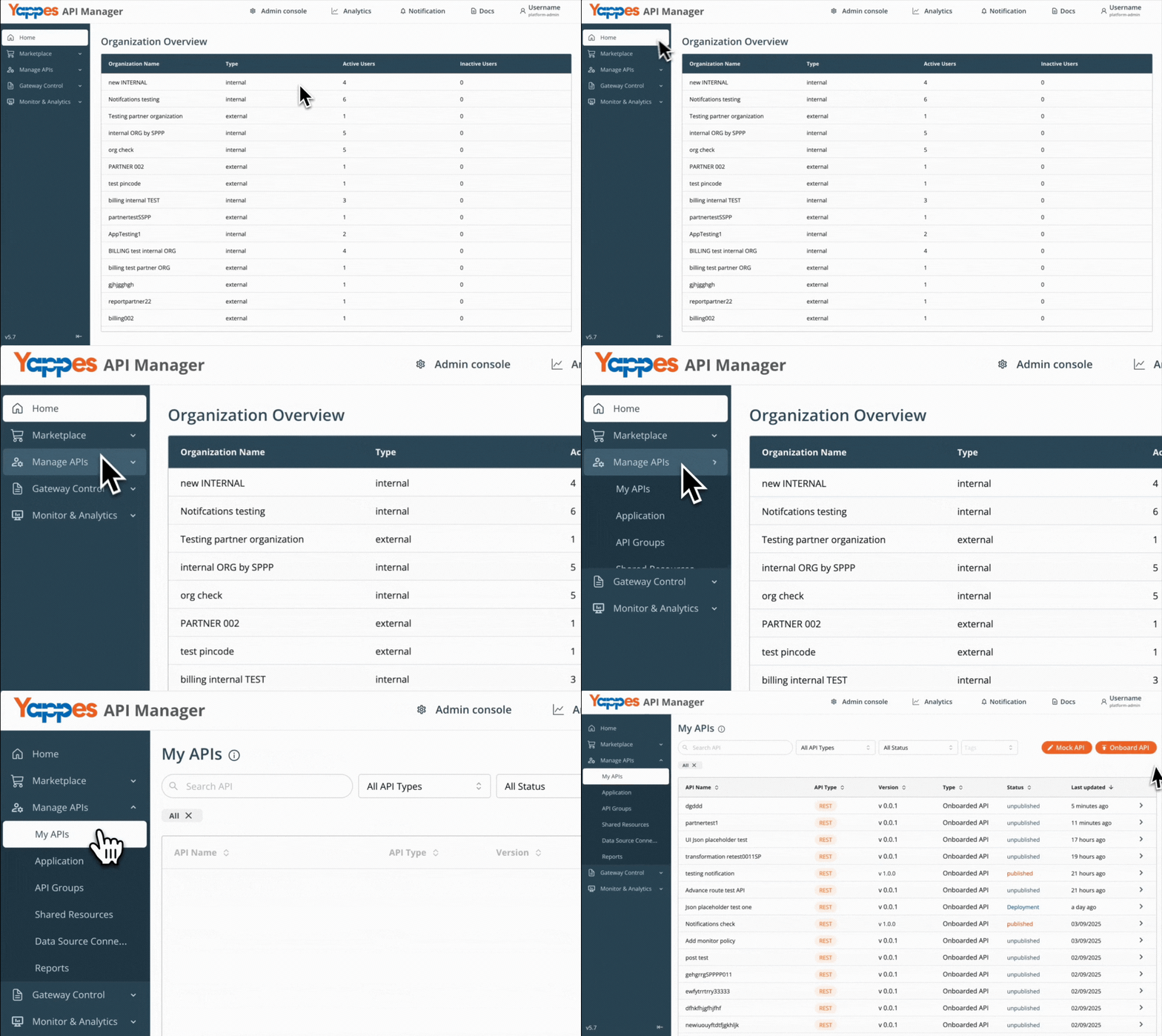
Step 2: Initiate API Onboarding
- Onboard from My APIs using the guide for your API type.
Step 3: Select Endpoint for attaching Schema Validation
- Click on your newly created endpoint (e.g.,
Update Profile). - The endpoint details panel will open.
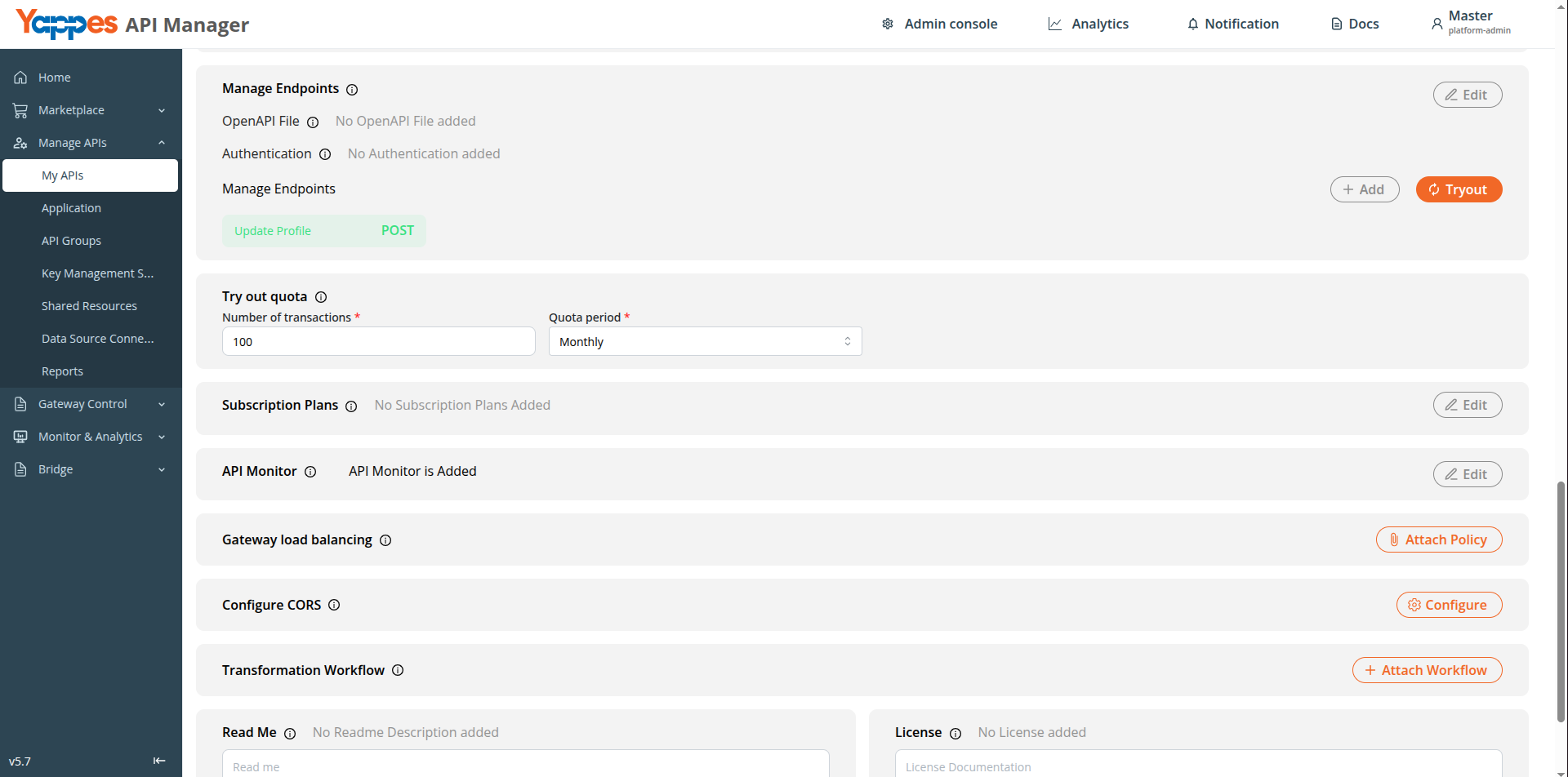
Step 4: Access Schema Validation Policy
- Click
Create Schema Validationto open the policy configuration panel. - The Schema Validation dialog will appear.
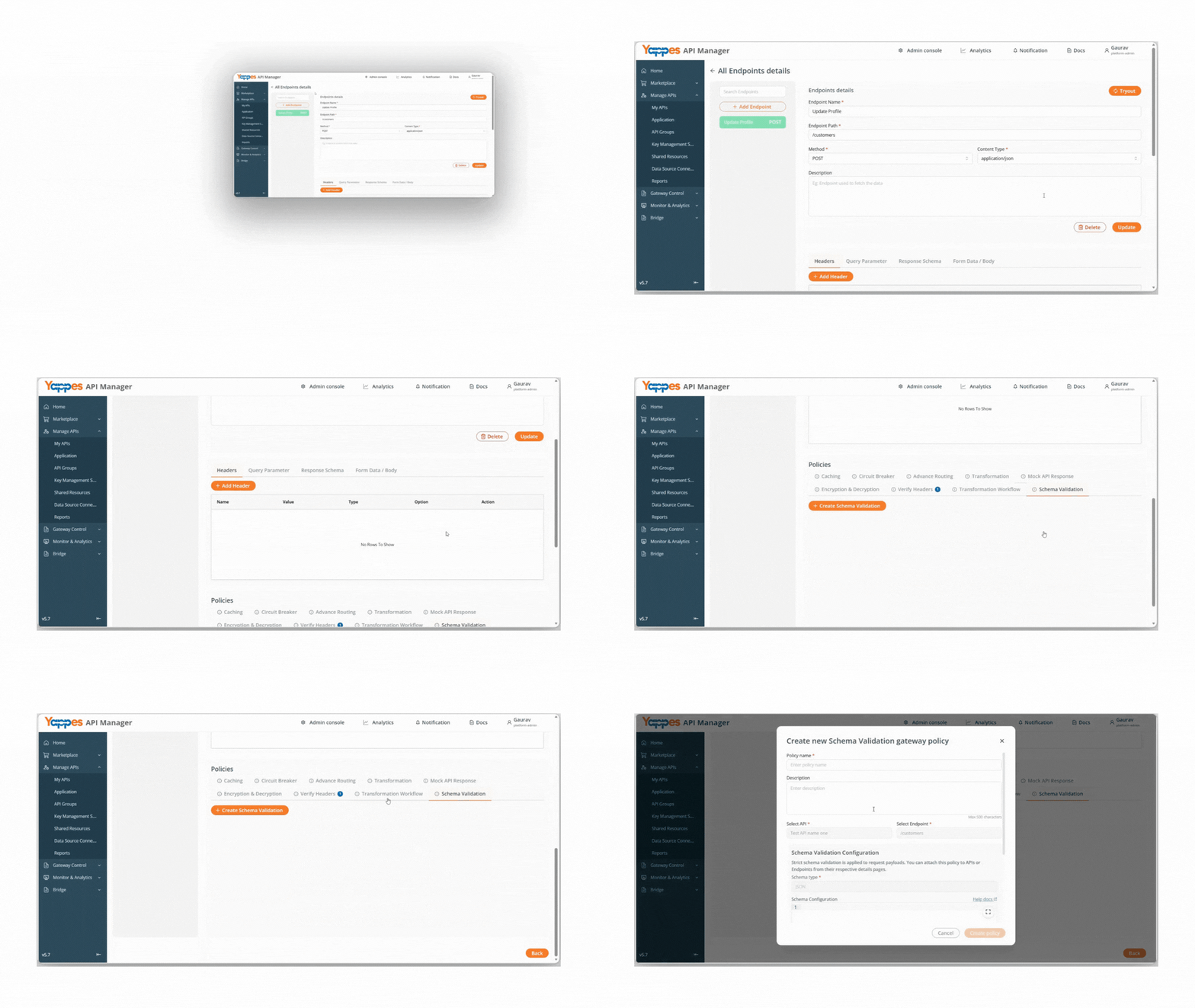
Step 5: Create the Schema Validation Policy
- Enter a descriptive name in the
Policy Namefield (e.g.,Customer_Request_Schema_Validation). - Add a detailed
descriptionin the Enter description field to document the policy purpose.
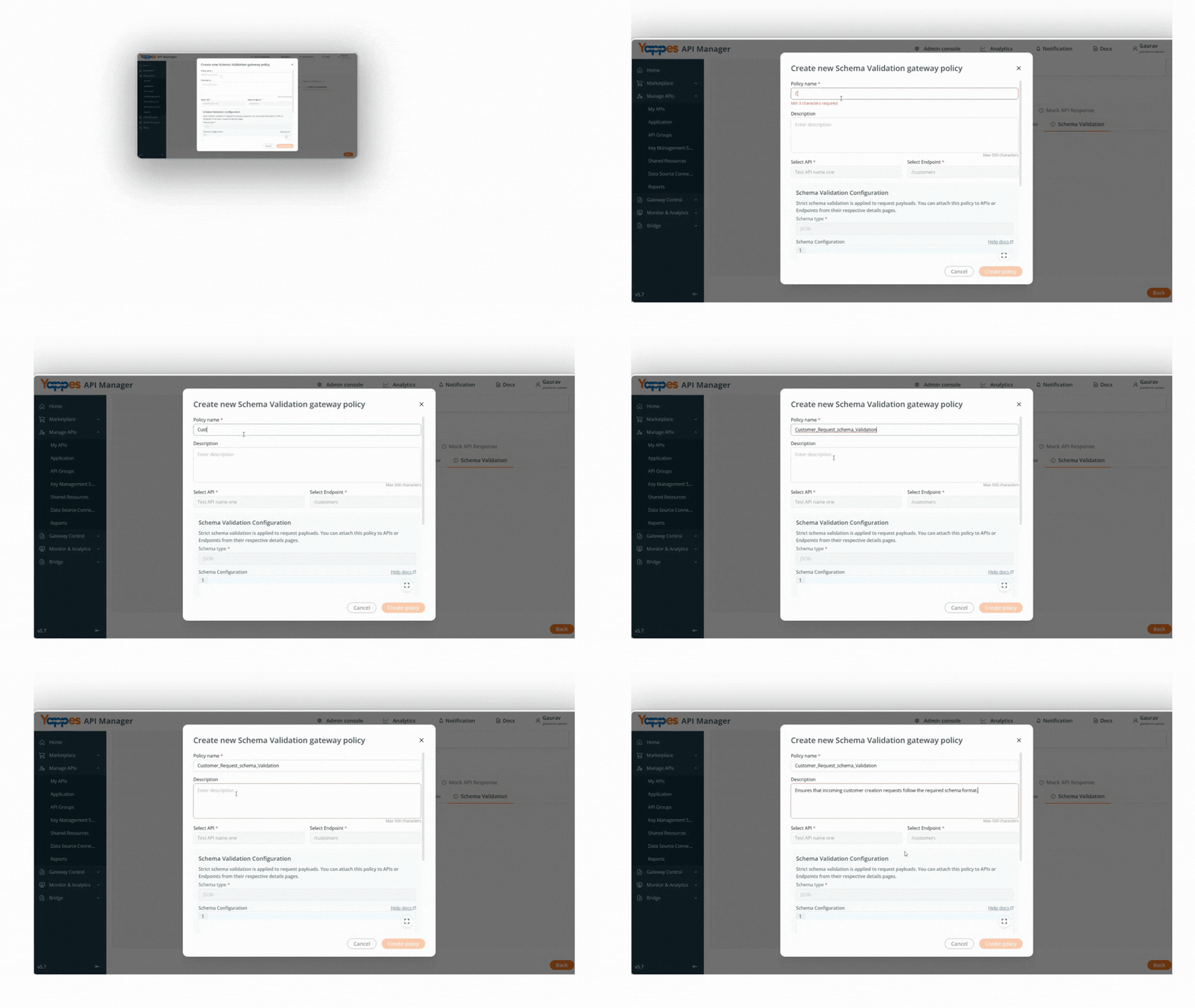
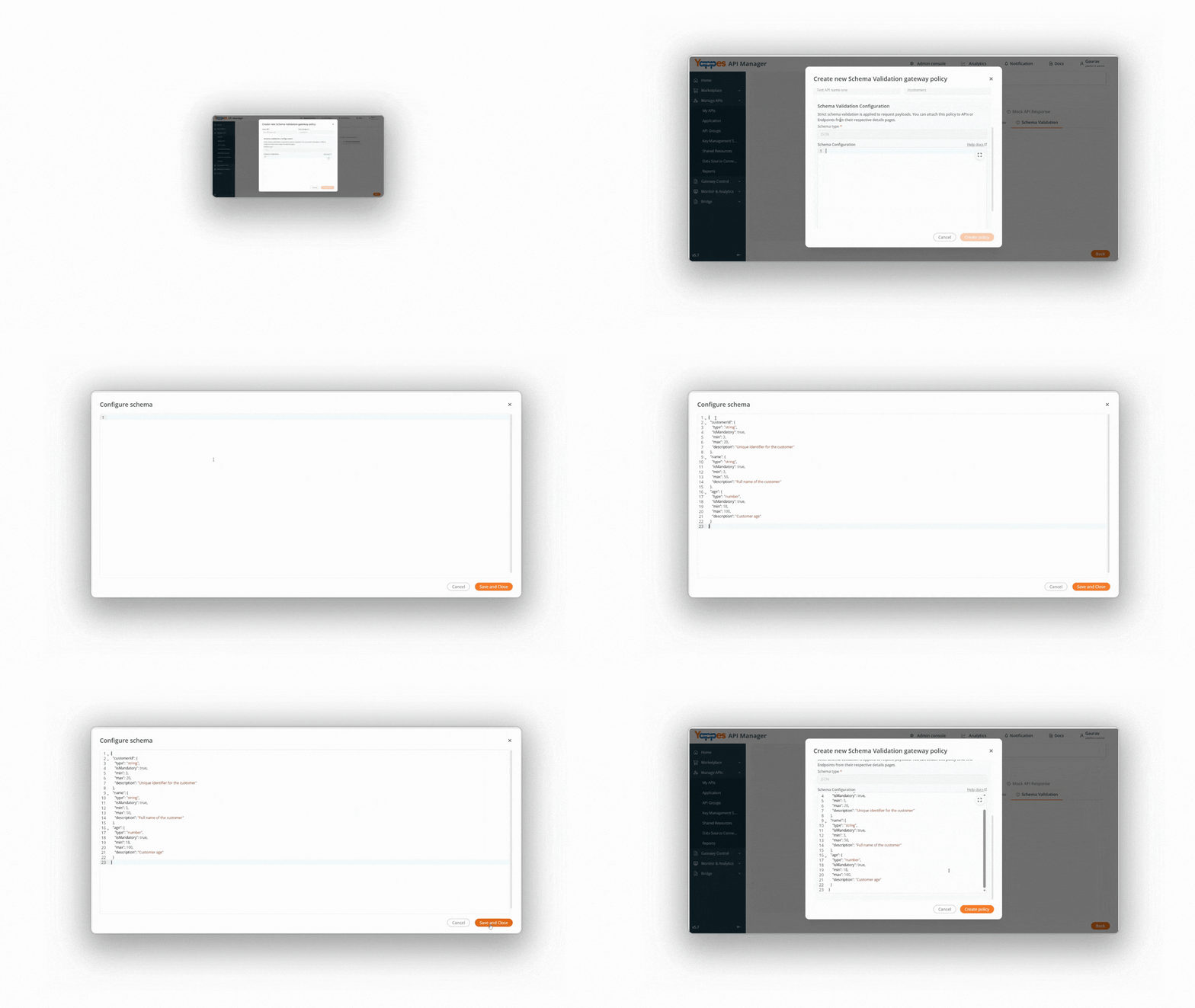
Step 6: Configure Schema Definition
- The
Schema Typefield is disabled by default and set toJSON. - Define the schema content directly in the
Schema Configurationeditor.
Note
- You may click the
Expandicon to open the editor in full-screen mode for better visibility. - If expanded, click
Save and Closeto save the schema and return to the policy window. - If configured directly in the modal, the schema is saved automatically.
Refer to the Schema Ruleset Configuration section for supported rule types and examples.
Step 7: Create the Policy
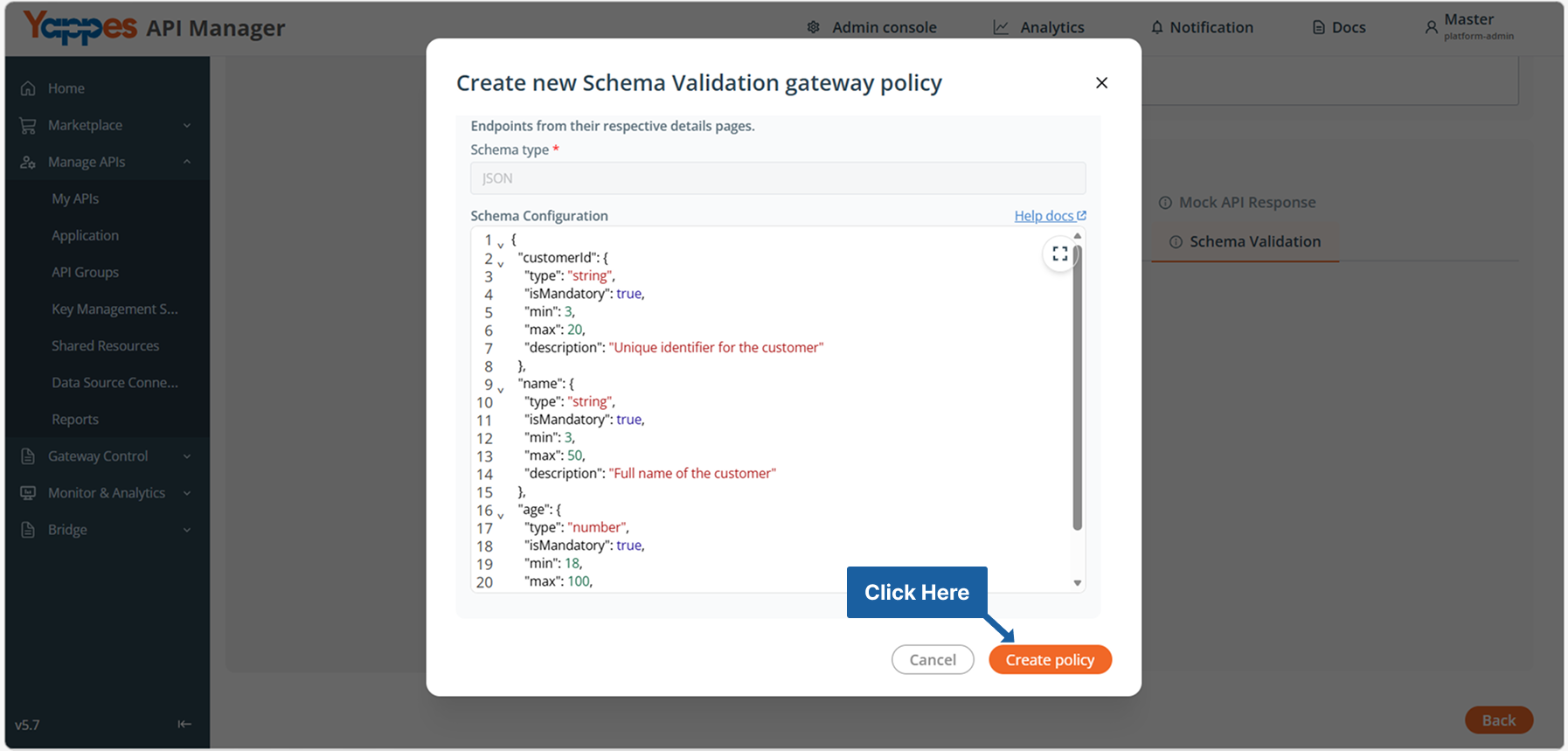
- Review the schema configuration.
- Click
Create Policy.
Success
The Schema Validation policy is successfully created.
Method 2: Creating Schema Validation from Gateway Policy Page
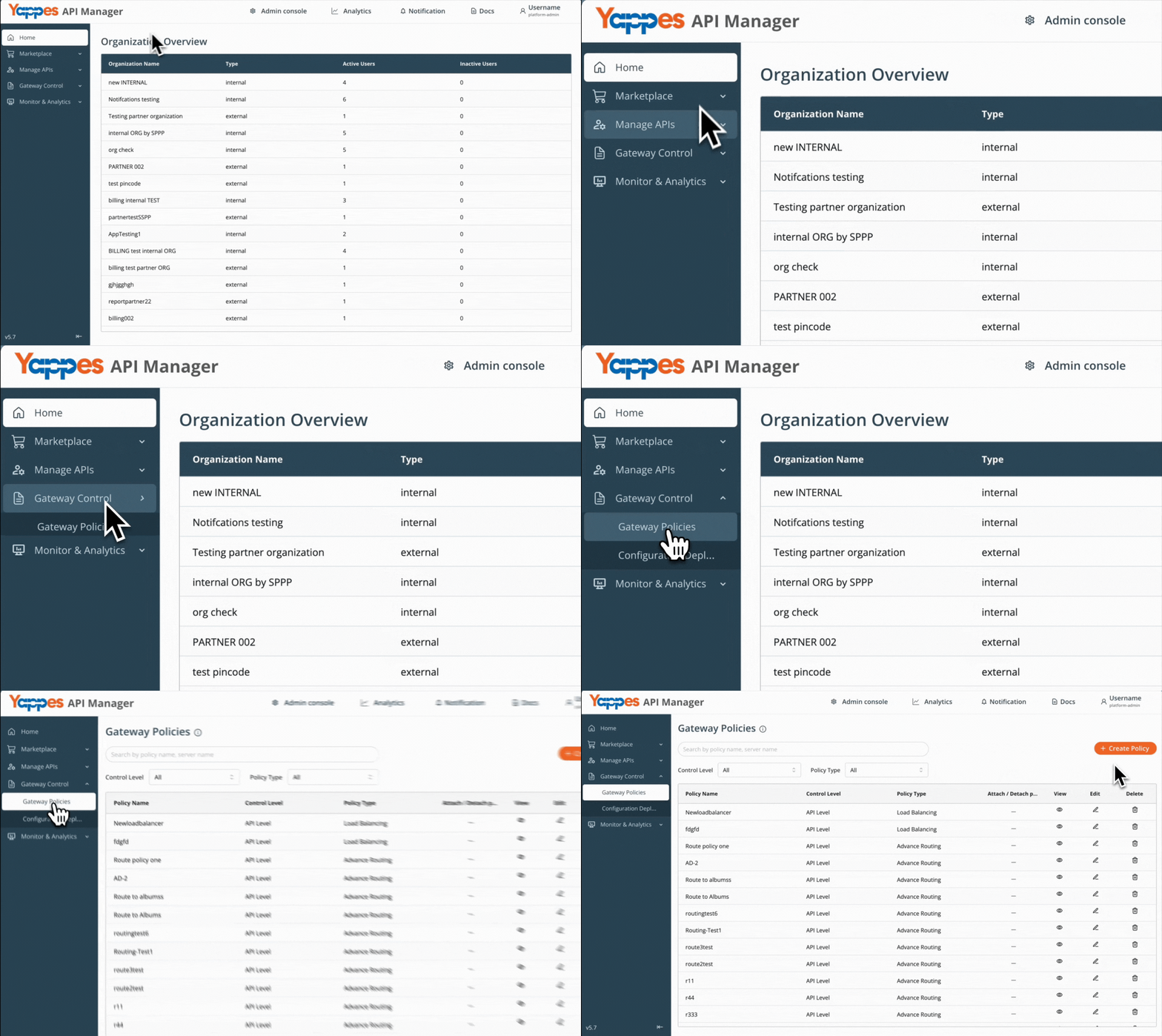
Step 1: Navigate to Gateway Policies
- Locate
Gateway Control → Gateway Policiesin the main navigation menu. - The policies management interface will display.
Step 2: Initialize New Policy Creation
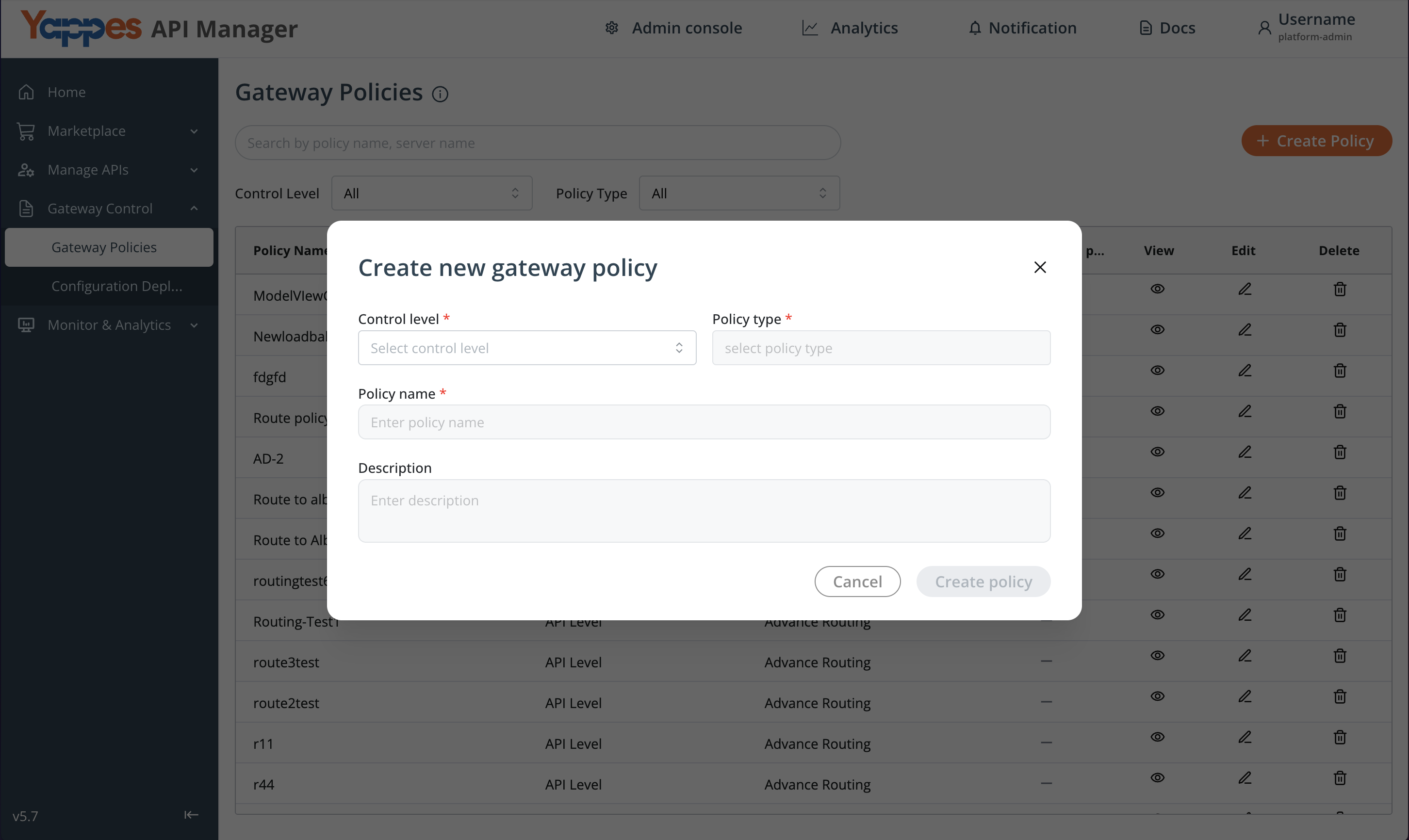
- Click the
+ Create Policybutton. - The policy creation modal will open.
Step 3: Configure Policy Settings
- Set the
Control LeveltoAPI Level. - In the
Policy Typedropdown, selectSchema Validation. - These settings determine the policy scope and functionality.
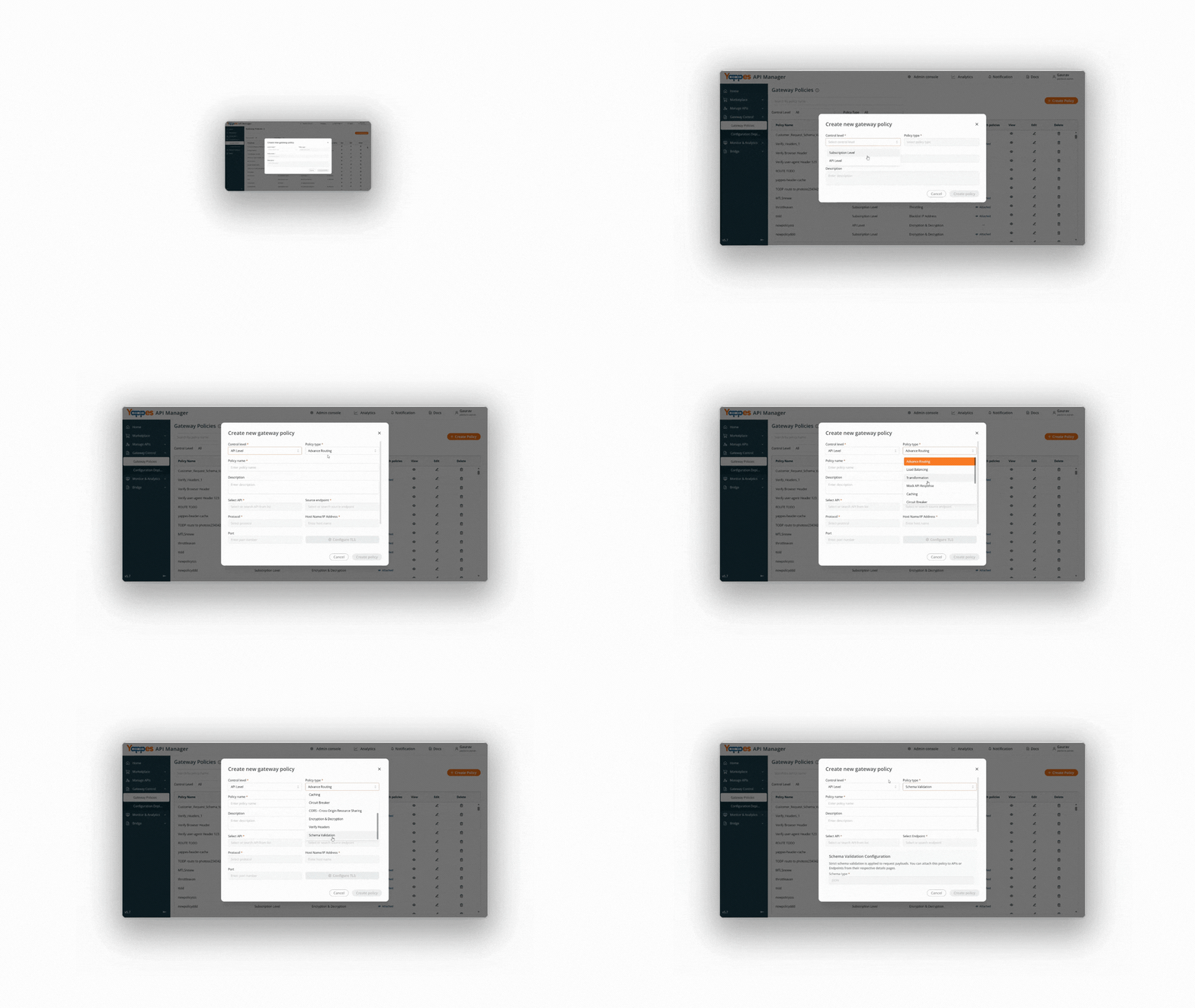
Step 4: Define Policy Details
- Enter a descriptive name in the
Policy Namefield (e.g.,Customer_Request_Schema_Validation). - Add a detailed
descriptionin the Enter description field to document the policy purpose.
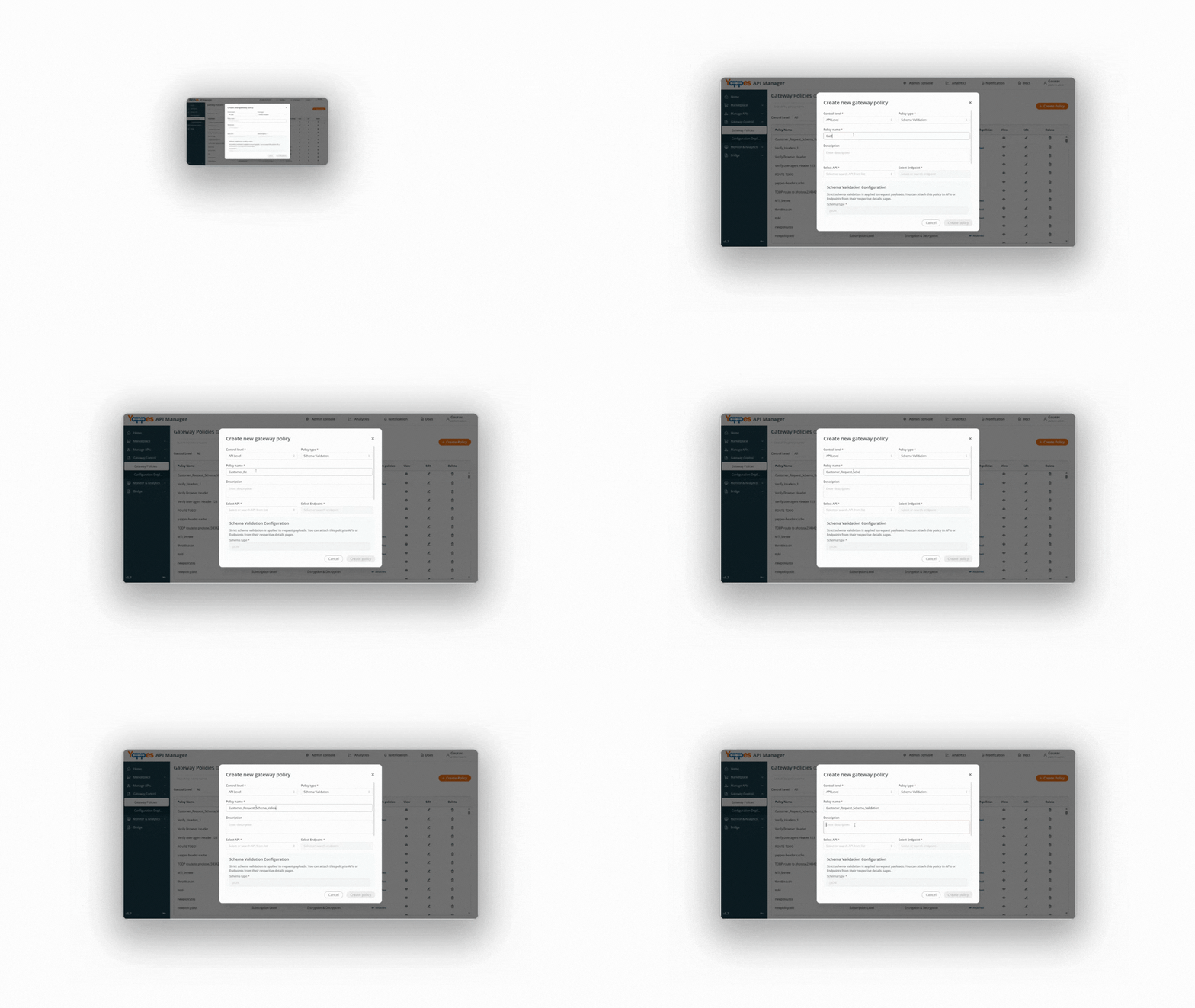
Step 5: Select Target API
- From the available APIs list, select the
API & Endpointto attach the policy.
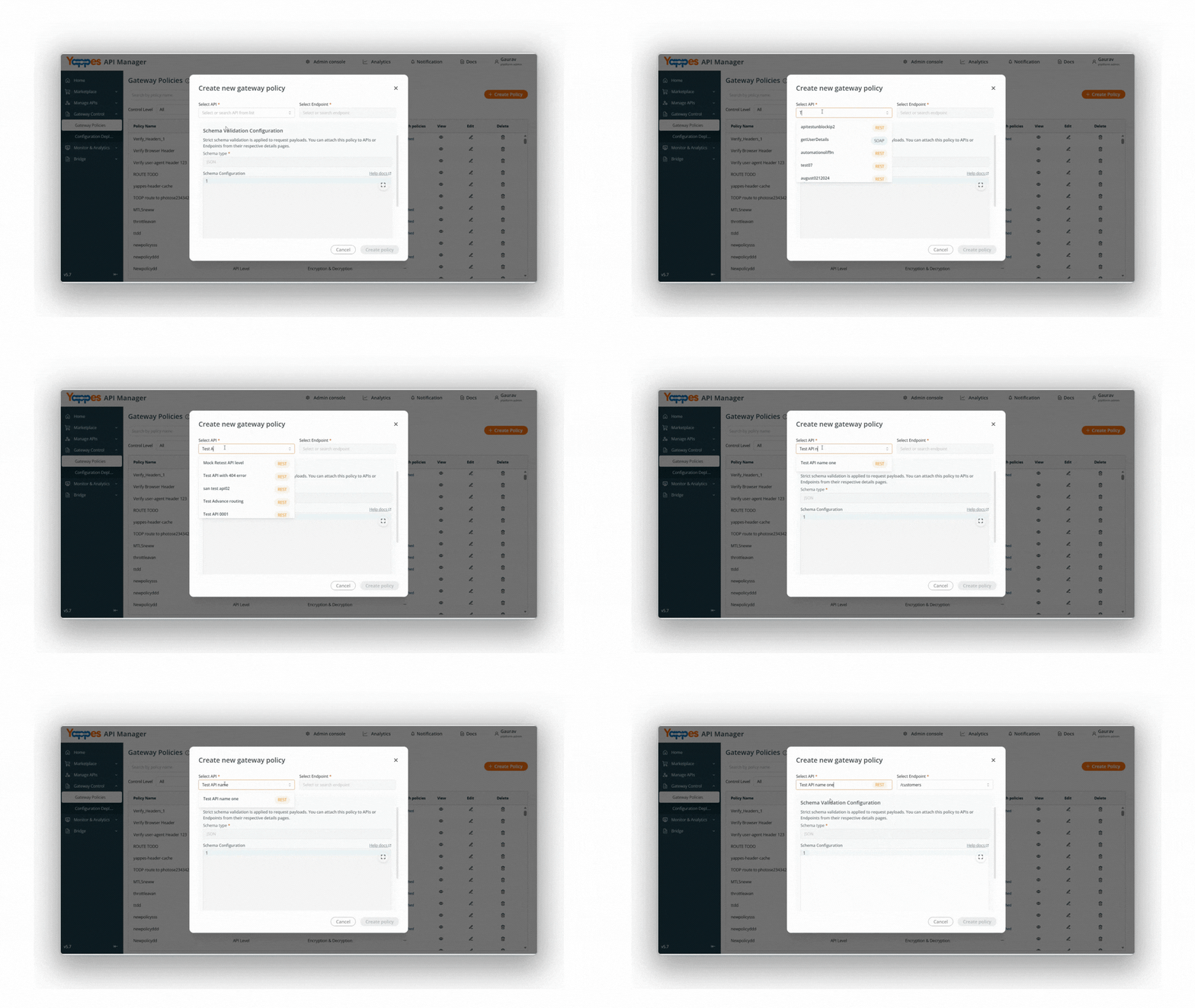
Step 6: Configure Schema Definition
- The
Schema Typefield is disabled by default and set toJSON. - Define the schema content directly in the editor.
- Click
Saveto store the policy configuration.
Refer to the Schema Ruleset Configuration section for supported rule types and examples.
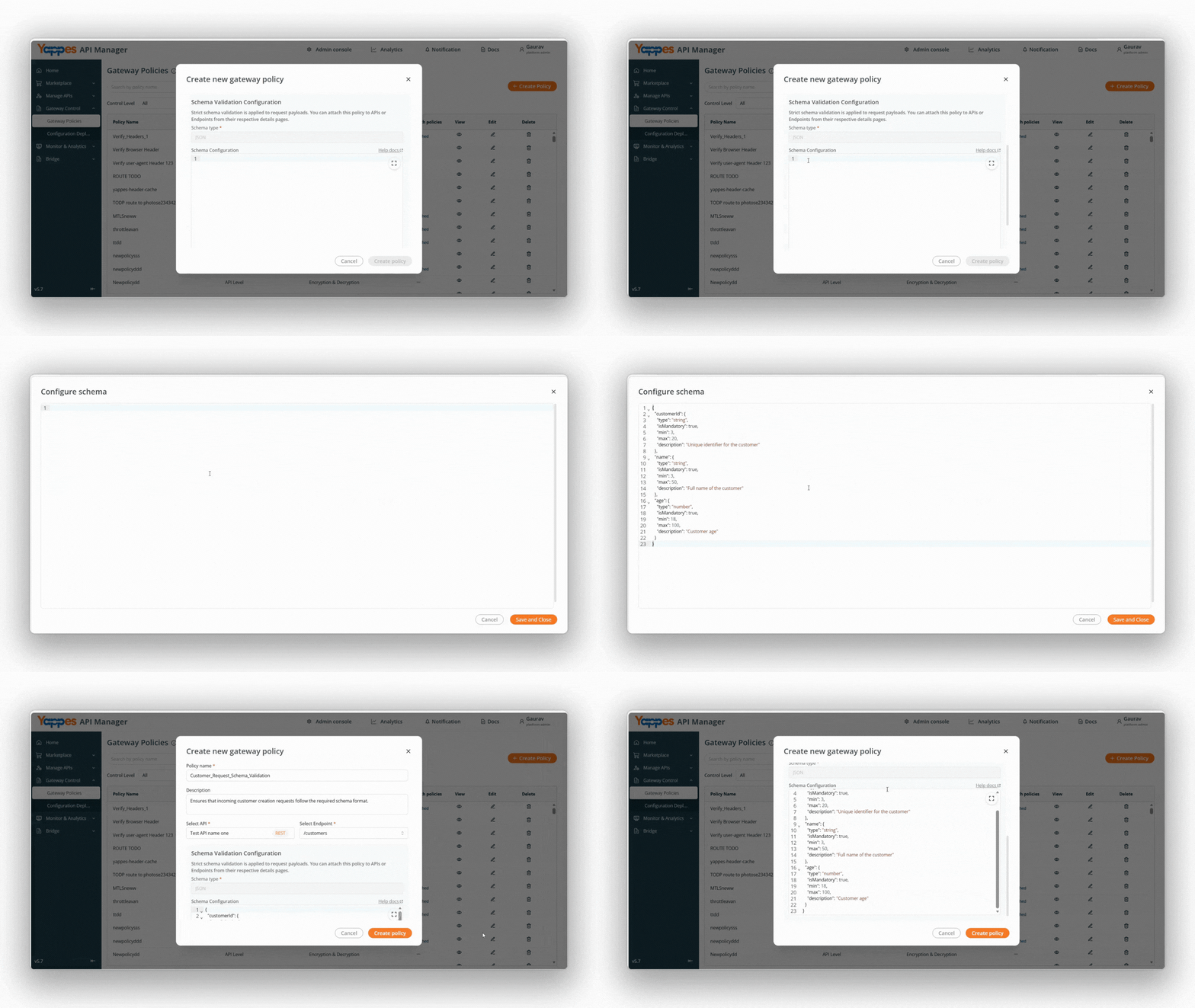
Step 7: Create the Policy
- Review the schema configuration.
- Click
Create Policy.
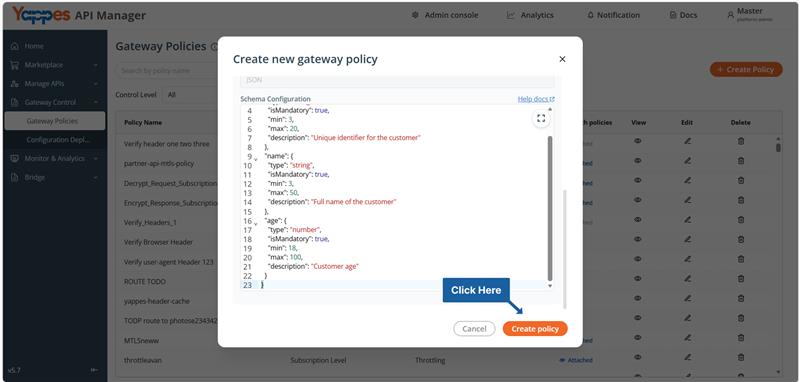
Success
The Schema Validation policy is successfully created.
Understanding the Interface
The Schema Validation interface consists of the following components:
| Component | Description |
|---|---|
Policy Name |
Identifies the Schema Validation policy. |
Description |
Explains the validation purpose and policy intent. |
Schema Editor |
Area where the validation ruleset is defined using supported rule types. |
Control Level |
Defines the enforcement scope (e.g., API Level). |
Gateway Policies |
Section where validation policies are managed and applied to APIs. |
Configuration and Settings
This section explains the required configuration fields when creating a Schema Validation policy.
Required Configuration Fields
| Field | Requirement | Description |
|---|---|---|
Policy Name |
Mandatory | Must be unique within the gateway. Should clearly identify the API and payload purpose. |
Description |
Mandatory | Should describe what the schema validates and its intended enforcement scope. |
Control Level |
Mandatory | Must be set to API Level. Defines the enforcement scope. |
API Selection |
Mandatory | Required to select the target API where validation will be enforced. |
Endpoint Selection |
Mandatory | Required to select the specific endpoint for which the request payload will be validated. |
Schema Definition |
Mandatory | Accepts JSON ruleset format only. Must follow the supported ruleset structure and be syntactically valid. |
Info
Schema Validation is applicable only to endpoints that accept request payloads (e.g., POST, PUT, PATCH).
GET endpoints do not support Schema Validation, as they do not contain a request body.
Schema Definition Behavior
Schema Typeis disabled by default and set to JSON.- The schema must follow the structure defined in the Schema Ruleset Configuration section.
- If the incoming request payload is in XML format, the configured JSON ruleset is internally converted for XML validation by the gateway.
Key Configuration Requirements
Field Validation Rules
- Field names are case-sensitive.
- Required fields must be explicitly declared using
"isMandatory": true. - Data types must strictly match the defined rule type (
string,number,boolean,object,array). - Missing required fields cause validation failure.
- Fields not defined in the ruleset are treated as invalid and result in validation failure.
Payload Handling Rules
- The entire request payload is validated against the configured schema.
- Partial validation is not supported.
- Empty payloads will fail validation if mandatory fields are defined in the schema.
Best Practices for Configuration
Follow these best practices when implementing Schema Validation:
| Best Practice | Benefit |
|---|---|
| Start with minimal required fields | Reduces false rejections and allows gradual enforcement. |
| Avoid frequent schema changes | Prevents unexpected client breakage. |
| Version APIs when schemas change | Maintains backward compatibility for existing consumers. |
| Test in non-production environments first | Prevents production outages and integration failures. |
| Notify API consumers before schema updates | Improves integration stability and reduces disruption. |
What Happens If Validation Fails
If schema validation fails:
- The request is blocked at the API Gateway.
- The backend service is not invoked.
- The client receives a schema validation error response.
- The failure is logged for monitoring and audit purposes.
Example Requests
Valid Request
{
  "customerId": "12345",
  "name": "John Doe",
  "age": 30
}
Why it passes:
- All required fields are present.
- Data types match the defined schema.
Invalid Request
{
  "customerId": 12345,
  "name": "John Doe"
}
- Incorrect data type for
customerId. - Missing required field
age.
Policy Evaluation Order
Schema Validation is executed during request processing at the gateway level:
- The request reaches the API Gateway.
- The Schema Validation policy executes.
- If validation fails, the request is blocked immediately.
- If validation succeeds, the request is forwarded to the backend service.
Info
Schema Validation short-circuits execution upon failure. No further processing or backend invocation occurs once validation fails.
Verification and Testing
After configuring the Schema Validation policy, verify its behavior using the following steps:
- Send a valid request and confirm the API responds successfully.
- Send an invalid request and confirm the request is rejected at the gateway.
- Review gateway logs to verify validation failure details.
- Confirm that the backend service receives only valid payloads.
Troubleshooting
If you encounter issues while using Schema Validation, refer to the table below:
| Issue | Possible Cause | Resolution |
|---|---|---|
| Requests blocked unexpectedly | Schema is too strict or overly restrictive | Review optional fields and relax constraints where appropriate |
| Validation errors returned | Payload does not match the defined schema | Correct the client request to match the configured ruleset |
| Policy not applied | Incorrect control level selected | Ensure Control Level is set to API Level |
Impact of Policy Changes
- Updating schemas may break existing client integrations.
- Tightening validation rules may cause previously accepted requests to fail.
- Relaxing required fields may allow unintended data to pass validation.
- Always test schema updates in non-production environments before deploying to production.
❓ Frequently Asked Questions
Does Schema Validation affect performance?
The performance impact is minimal and occurs at the gateway level before backend routing.
Can the same schema be reused across APIs?
Yes. The same Schema Validation configuration can be attached to multiple APIs or endpoints.
Is XML supported?
Yes. XML request payloads are supported.
Schema Validation currently supports JSON ruleset configuration only.
If an incoming request payload is in XML format, the configured JSON ruleset is internally converted by the gateway for XML validation.
Direct upload of XML Schema (XSD) files is not supported.
Pro Tip
Schema Validation in Yappes enforces secure, standards-based JSON and XML request validation at the API Gateway to protect backend services and ensure contract compliance.