JSON Threat Protection
Overview
JSON Threat Protection in Yappes guards JSON payloads at the API Gateway against oversized or deeply nested structures that can indicate denial-of-service or injection attacks.
This feature helps organizations to:
- Limit JSON payload size and nesting depth before requests reach backend services
- Block malicious or abnormally large JSON structures early in the request lifecycle
- Protect backend systems from JSON-based abuse without changing application code
- Enforce consistent structural limits across API endpoints
When applied at the API or subscription level, JSON Threat Protection enforces structural limits on JSON payloads at the Yappes Gateway before they reach backend services.
JSON Threat Protection aligns with OWASP API Security best practices for input validation and payload size control.
When to Use JSON Threat Protection
Use JSON Threat Protection when:
- APIs accept JSON request or response payloads
- You need to cap array length, object depth, or string size at the gateway
- Backend services should be protected from oversized or deeply nested JSON
- You want separate request and response limits per endpoint
When Not to Use JSON Threat Protection
Avoid using JSON Threat Protection in the following scenarios:
- The endpoint uses XML content type only (use XML Threat Protection instead)
- You need pattern-based blocking on URI, headers, or query parameters (use Regex Threat Protection)
- Payload structure validation against a fixed schema is required (use Schema Validation)
Prerequisites
Before configuring JSON Threat Protection policies, ensure the following requirements are met.
Required Access and Permissions
Common Requirements
- Active Yappes platform account
API Manageraccess- Permission to create and manage Gateway Policies
- At least one API created under
My APIs
API Level
- Endpoint content type is
application/jsonorapplication/x-www-form-encoded - For GET endpoints, only Response context is supported (no request body)
Subscription Level
- API must be
published - An
active subscriptionmust be available on the Manage Subscriptions page
JSON Configuration
JSON Threat Protection is configured in a code editor labeled JSON Configuration. A default template is loaded when you select Context (Request or Response). Edit the JSON object to set limits for your endpoint.
Configuration Properties
| Property | Required | Description | Default |
|---|---|---|---|
enabled |
Yes | Turns threat protection on or off for this policy | true |
continueOnError |
Yes | If true, the request proceeds even when evaluation fails |
false |
limits.arrayElementCount |
Yes | Maximum number of elements allowed in a JSON array | 50 |
limits.containerDepth |
Yes | Maximum nesting depth of JSON objects and arrays | 15 |
limits.objectEntryCount |
Yes | Maximum number of key-value pairs in a JSON object | 25 |
limits.objectEntryNameLength |
Yes | Maximum length of an object property name | 100 |
limits.stringValueLength |
Yes | Maximum length of a JSON string value | 1000 |
Default Template Example
{
  "enabled": true,
  "continueOnError": false,
  "limits": {
    "arrayElementCount": 50,
    "containerDepth": 15,
    "objectEntryCount": 25,
    "objectEntryNameLength": 100,
    "stringValueLength": 1000
  }
}
Note
- Click the Expand icon to open the editor in full-screen mode for easier editing.
- The configuration must be valid JSON with at least one key-value pair.
Content-type warnings
Endpoint tab: When the endpoint uses application/json or application/x-www-form-encoded, the info banner shows: "This endpoint uses JSON-compatible content type, so only JSON Threat Protection is available." The same banner also includes the request/response attachment limit and the JSON format note.
Gateway Policies: If you select an endpoint whose content type is not JSON-compatible, the platform shows: "This endpoint's content type is not compatible with JSON Threat Protection. Please select a JSON-compatible endpoint (application/json or application/x-www-form-urlencoded)." The configuration editor is hidden and save is blocked until you select a JSON-compatible endpoint.
Custom error and message
For error scenarios, you can override the default HTTP status code, error code, and message. See Custom Error and Message.
Step-by-Step Implementation
Method 1: Creating JSON Threat Protection from the Endpoint Tab
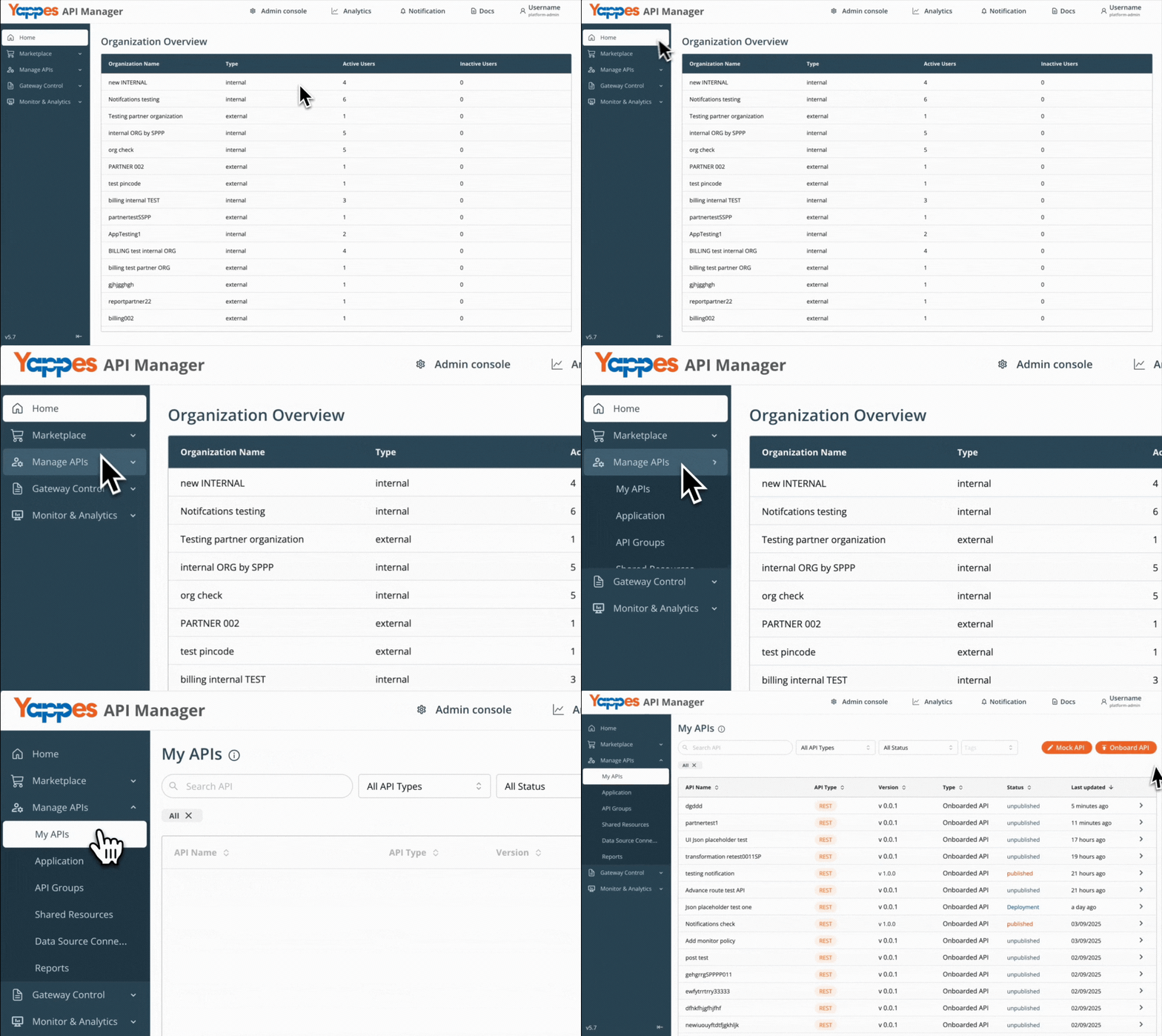
Step 1: Navigate to API Manager
- Click on
Manage APIsin the main dashboard. - Select
My APIsfrom the submenu.
Step 2: Open Your API and Select an Endpoint
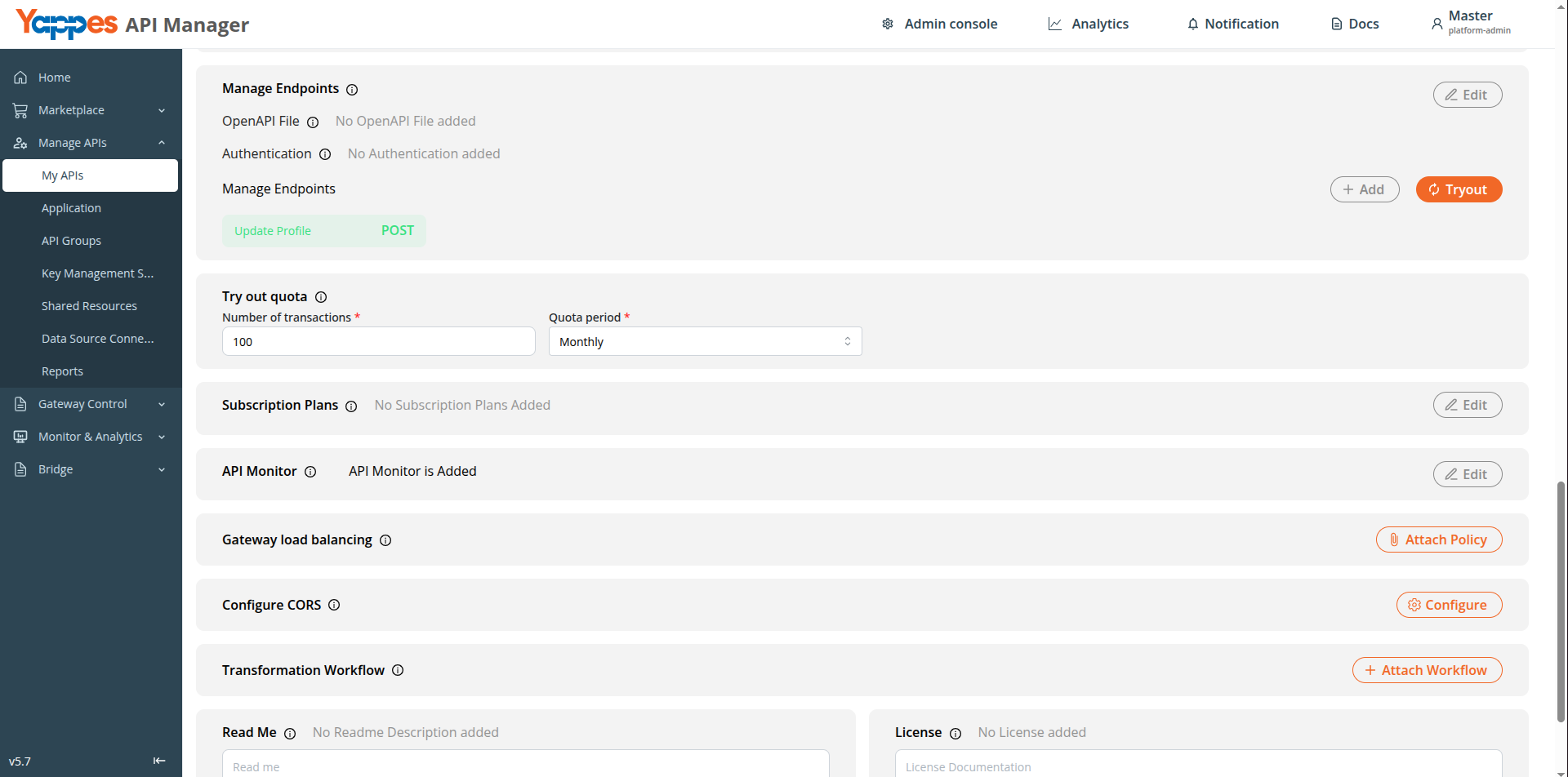
- For a new API, onboard from My APIs using the guide for your API type, then open endpoint details.
- For an existing API, select it from
My APIsand click the target endpoint. - The endpoint must use a JSON-compatible content type (
application/jsonorapplication/x-www-form-encoded). - The endpoint tab info banner shows that only JSON Threat Protection is available for JSON-compatible content types, and that policy language is JSON regardless of content type.
Step 3: Open JSON Threat Protection Tab
- Click the
JSON Threat Protectiontab on the endpoint details panel. - Click
JSON Threat Protectionto create a new policy, orEdit/Viewon an existing attached policy.
Step 4: Enter Policy Details
- Enter a descriptive
Policy name(e.g.OrderEndpointJsonRequestProtection). - Add a
Description(max 500 characters). Select APIand endpoint fields are read-only.
Step 5: Select Context and Configure JSON
- Select
Context—RequestorResponse. - On
GETendpoints, onlyResponseis available. - Edit the
JSON Configurationin the editor. Refer to JSON Configuration for property details.
Step 6: Create the Policy
- Review the configuration.
- Click
Create policy(orSavewhen editing). Expected Result: The policy is attached to the endpoint.
Info
Each endpoint can have one request and one response JSON Threat Protection policy. On GET endpoints, you can attach one response policy only.
Method 2: Creating JSON Threat Protection from Gateway Policies Page
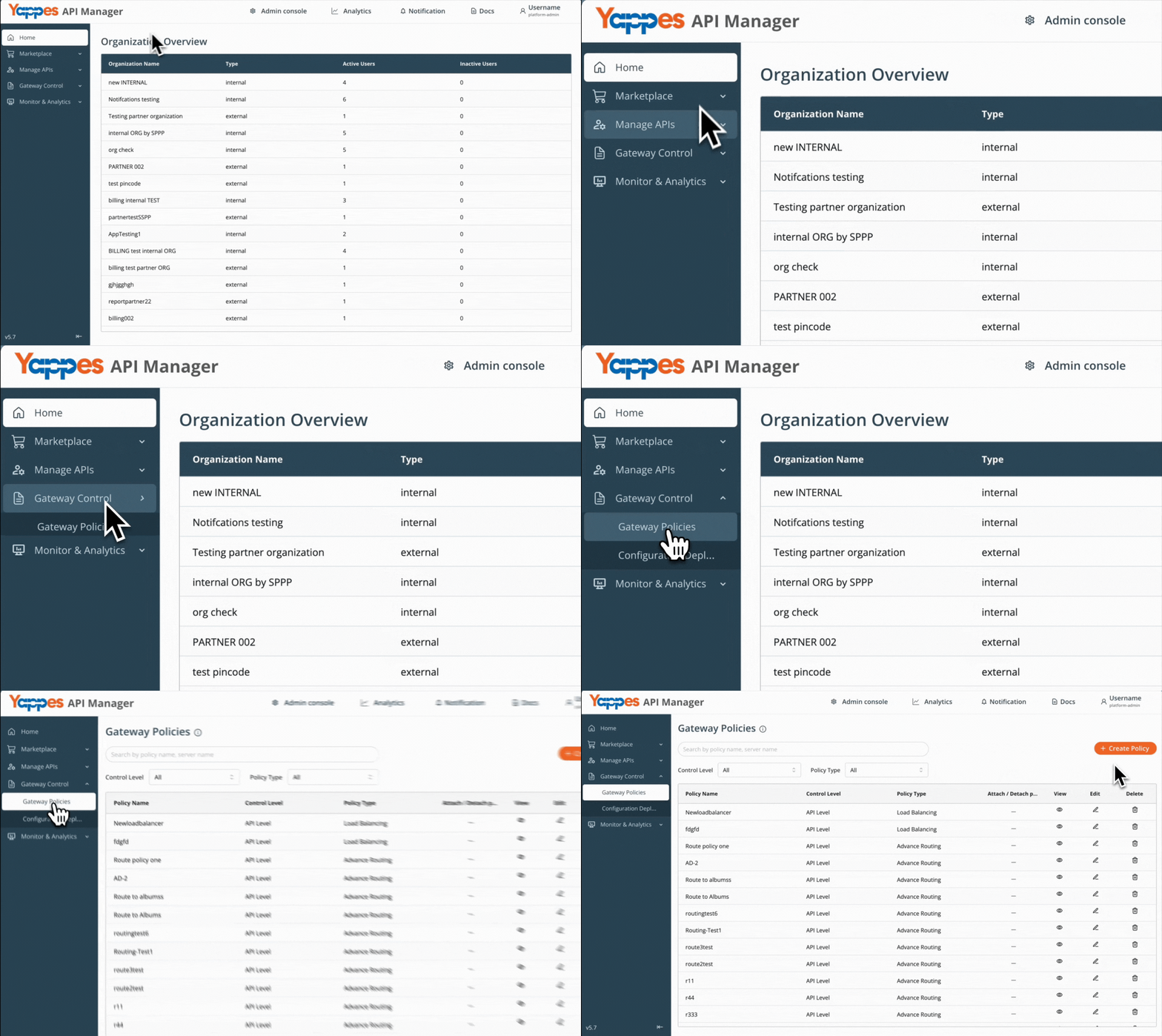
Step 1: Navigate to Gateway Policies
- Locate
Gateway Control → Gateway Policiesin the main navigation menu.
Step 2: Configure Policy Settings
- Click
Create Policy. - Select the appropriate
Control Levelbased on where the policy is required: API Level— Applies JSON Threat Protection to a specific API endpoint at creation.Subscription Level— Creates a reusable policy for attachment to consumer subscription endpoints.- In
Policy Type, selectJSON Threat Protection.
For general policy creation guidance, see Creating a policy (w/edit and delete).
Step 3: Define Policy Details
- Enter
Policy NameandDescription.
Step 4: Select API and Endpoint (API Level Only)
- If
Control Levelis set toAPI Level: - Select the target
APIandSource endpoint(orOperationfor SOAP APIs). - JSON Threat Protection requires a JSON-compatible endpoint content type (
application/jsonorapplication/x-www-form-urlencoded). - If the selected endpoint is not JSON-compatible, the platform shows: "This endpoint's content type is not compatible with JSON Threat Protection. Please select a JSON-compatible endpoint (application/json or application/x-www-form-urlencoded)." The editor is hidden and save is blocked.
- If
Control Levelis set toSubscription Level: - No API or endpoint selection is required.
Step 5: Select Context and Configure JSON
- Select
Context—RequestorResponse. - On
API Levelwith aGETendpoint, onlyResponseis available. - Edit
JSON Configurationin the editor. Refer to JSON Configuration for property details.
Info
At Subscription Level, both Request and Response context are available during policy creation. GET endpoint restrictions apply when you attach the policy to endpoints in Manage Subscriptions — request-context policies are not listed when a GET endpoint is selected.
Step 6: Create the Policy
- Review all settings.
- Click
Create Policy.
Success
The JSON Threat Protection policy is successfully created.
Attaching JSON Threat Protection Policy to Subscriptions
Use this flow when you created a policy with Control Level set to Subscription Level in Gateway Policies.
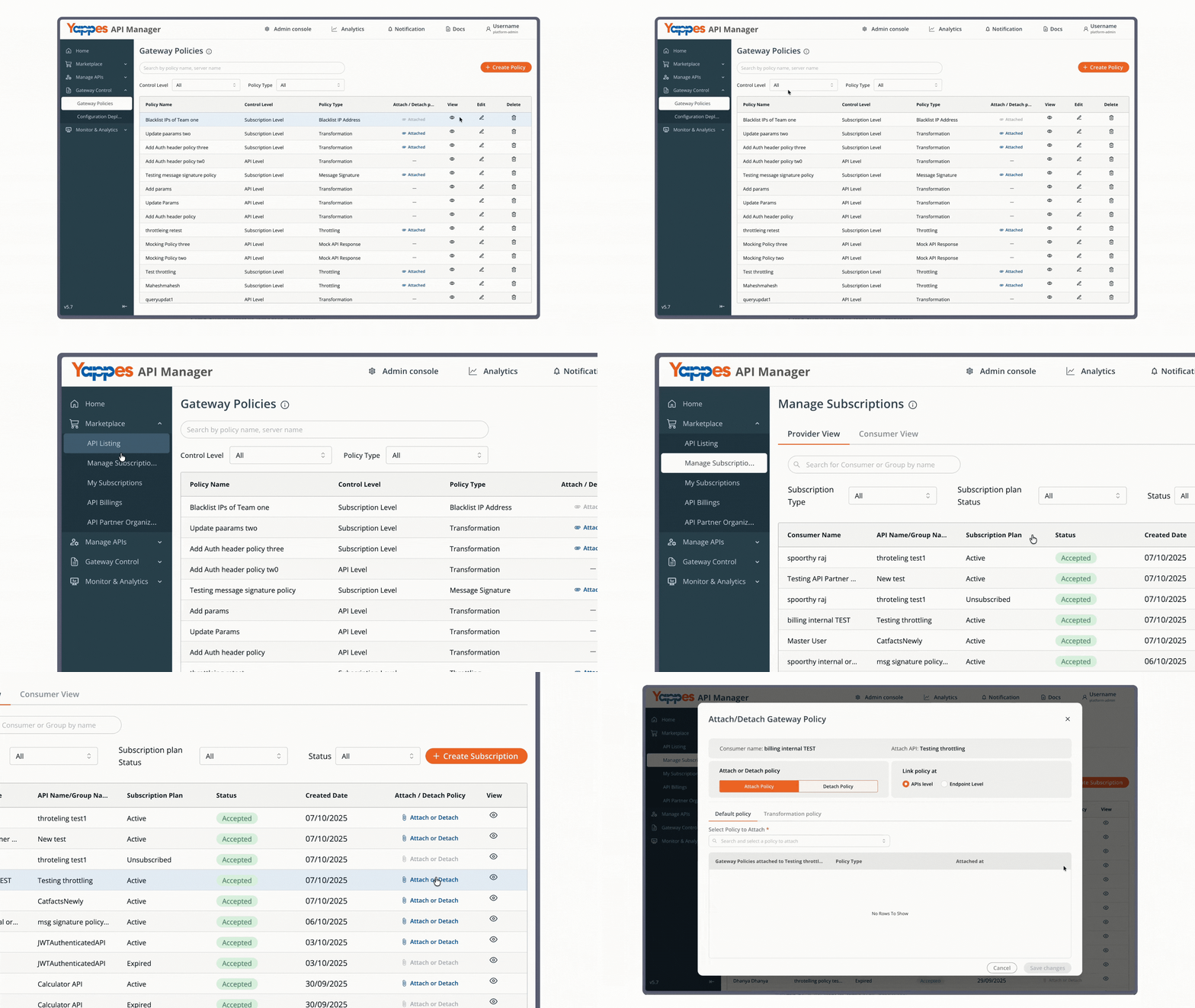
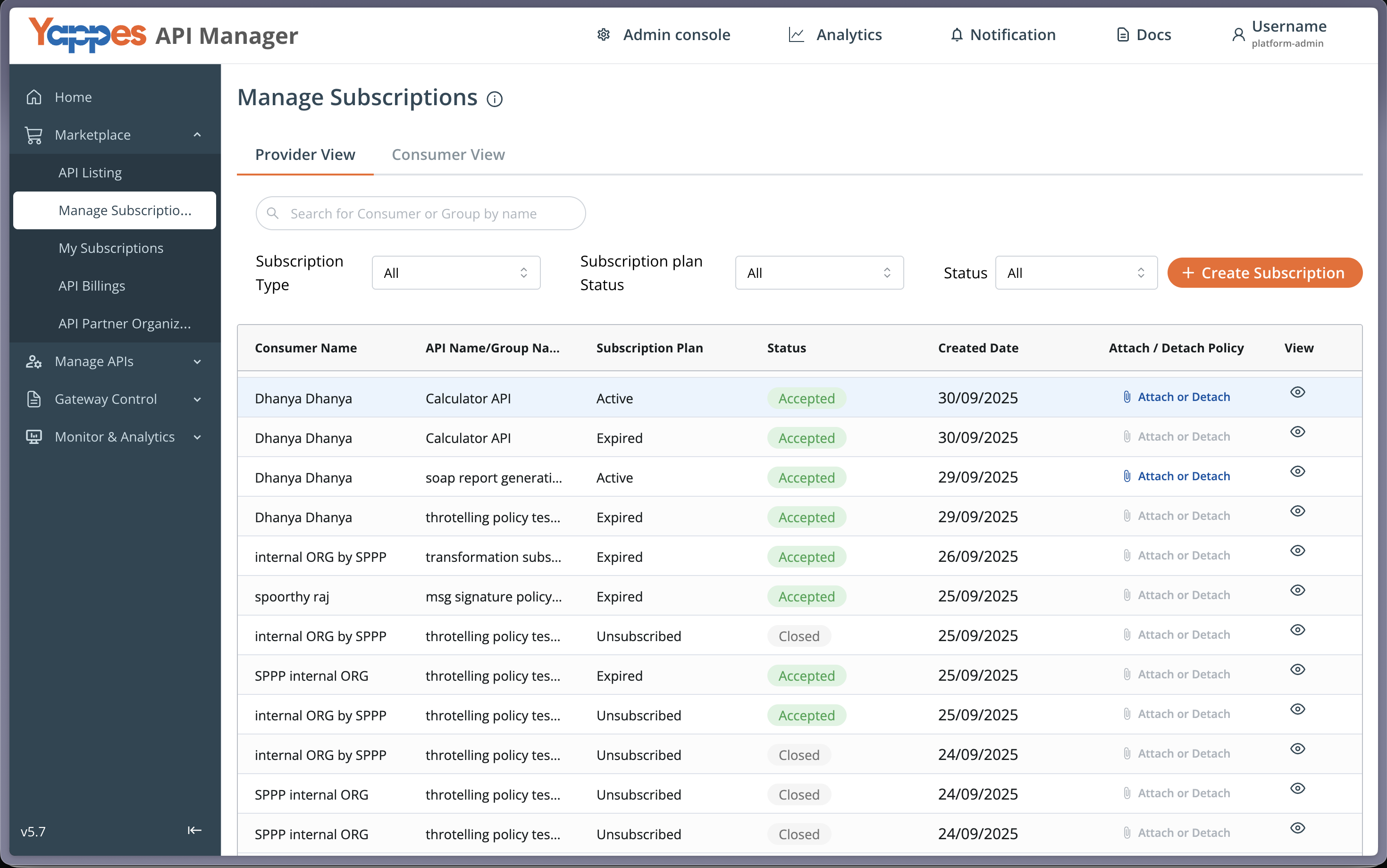
Step 1: Navigate to Manage Subscriptions
- From the main menu, click
Manage Subscriptions. - The
Manage Subscriptionspage displays a list of all API subscriptions. - Locate the subscription where you want to apply the JSON Threat Protection policy.
Step 2: Open the Policy Attachment Dialog
- Click
Attach or Detachfor the relevant subscription. - The policy attachment dialog opens.
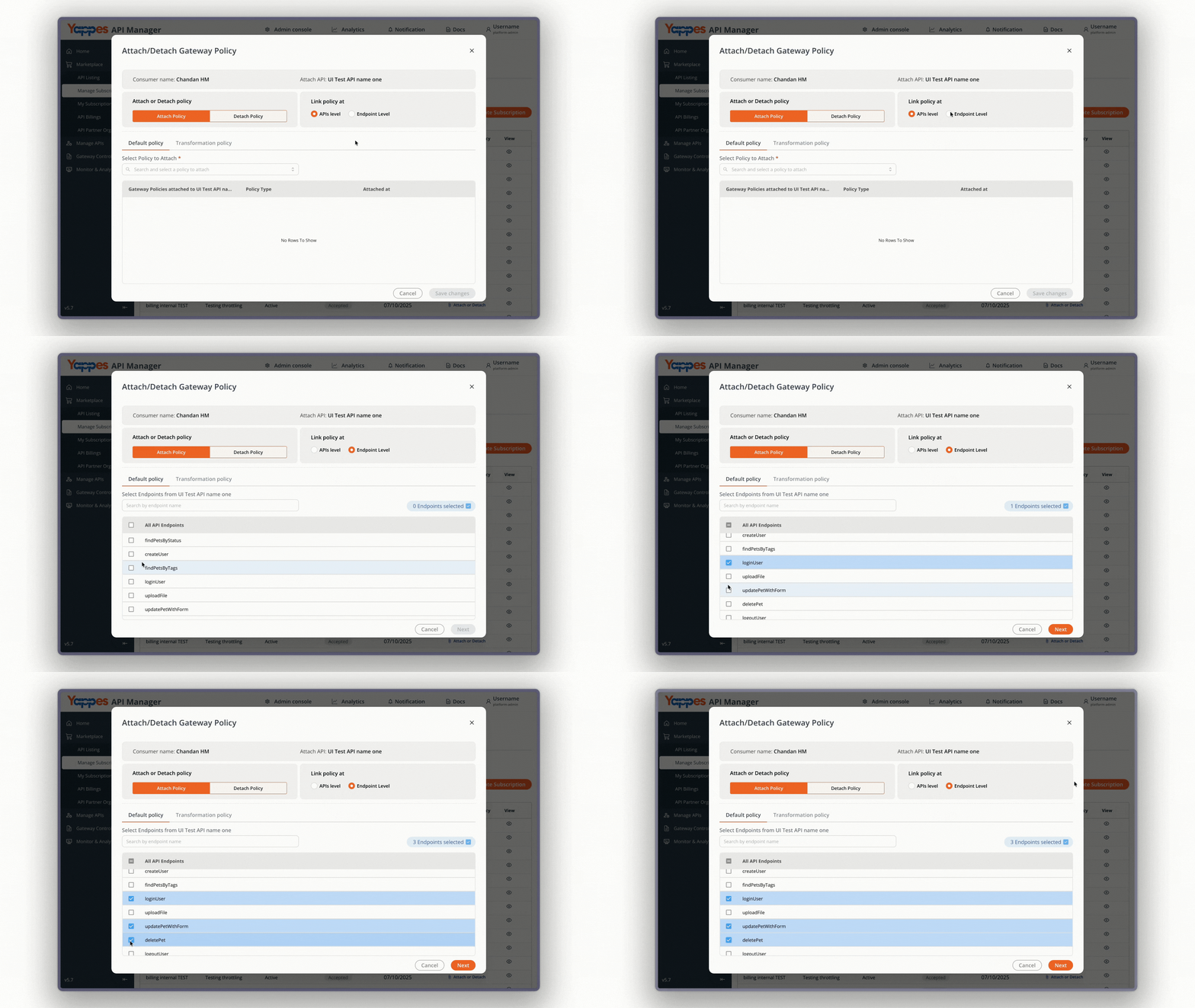
Step 3: Select Endpoint Level
- In the
Attach Policytab, selectEndpoint Level. - JSON Threat Protection policies do not appear when
API Levelis selected. The platform shows: "Custom Plugin, JSON, XML and Regex Threat Protections are not listed and cannot be attached at API level."
Step 4: Select Endpoints
- Select one or more endpoints from the endpoint list.
- Only endpoints with
application/jsonorapplication/x-www-form-encodedcontent type are compatible with JSON Threat Protection policies. - If a
GETendpoint is among your selection,Requestcontext policies are not available for attachment. - After selecting endpoints, proceed to the policy selection step.
For general attach and detach steps, see Manage Subscriptions — Attach/Detach Gateway Policies.
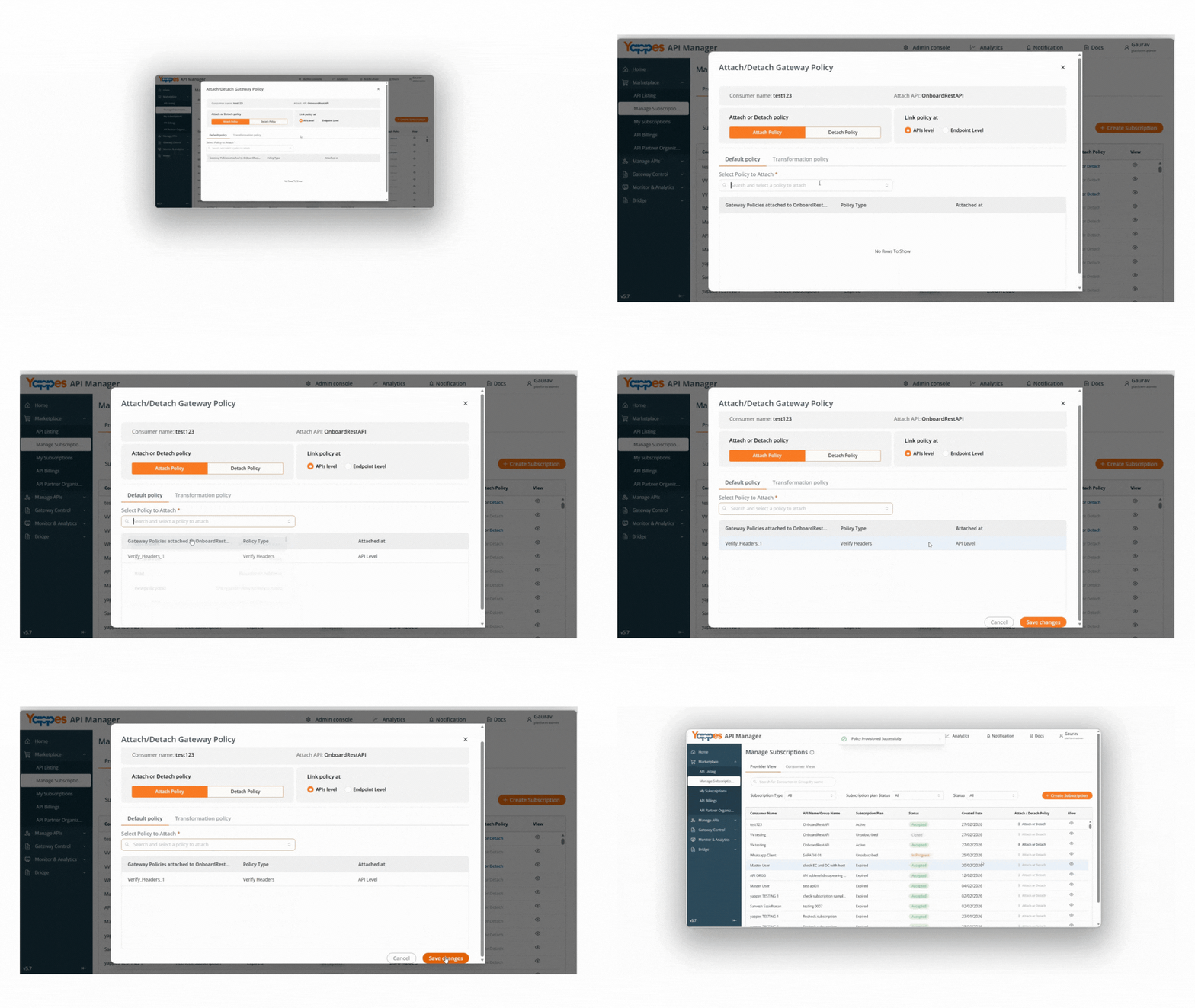
Step 5: Select and Attach the Policy
- In
Select Policy to Attach, choose your subscription-level JSON Threat Protection policy. - Click
Save Changesto apply the policy to the selected endpoints.
Note
- Only one policy of the same type can be attached to a subscription at a time. Detach the existing policy before attaching a replacement.
- Each endpoint supports at most one request and one response JSON Threat Protection policy.
Understanding the Interface
| Component | Description |
|---|---|
| Policy Name | Identifies the JSON Threat Protection policy |
| Description | Documents the policy purpose |
| Context | Request or Response — where limits are enforced |
| JSON Configuration | Code editor for JSON limit settings |
| Control Level | API Level (single endpoint at creation) or Subscription Level (attach via Manage Subscriptions) |
Control Level Summary
| Control Level | API/Endpoint at Creation | Attach Path |
|---|---|---|
| API Level | Required | Endpoint tab or Gateway Policies (auto-attached to selected endpoint) |
| Subscription Level | Not required | Manage Subscriptions → Endpoint Level |
Configuration and Settings
Required Configuration Fields
| Field | Requirement | Description |
|---|---|---|
| Policy Name | Mandatory | Min 3 characters; must start with a letter |
| Description | Optional | Max 500 characters |
| Control Level | Mandatory | API Level or Subscription Level |
| API Selection | Mandatory at API Level | Target API; not required at Subscription Level |
| Endpoint Selection | Mandatory at API Level | Specific endpoint for enforcement; not required at Subscription Level |
| Context | Mandatory | Request or Response |
| JSON Configuration | Mandatory | Valid JSON with configured limits |
Info
GET endpoints do not support Request context for JSON Threat Protection. The platform shows: "Get endpoint can not have request context" and limits you to Response only.
Each endpoint supports at most one request and one response JSON Threat Protection policy.
Best Practices for Configuration
| Best Practice | Benefit |
|---|---|
| Start with default limits and tune based on real traffic | Reduces false blocks while maintaining protection |
| Set separate request and response policies when both bodies differ in size | More precise control per direction |
Keep continueOnError as false in production |
Ensures limits are strictly enforced |
| Test with oversized payloads in a non-production environment | Confirms blocking behavior before rollout |
| Use Regex Threat Protection alongside JSON limits for pattern-based attacks | Defense in depth |
What Happens If a Request Is Blocked
If JSON Threat Protection detects a limit violation:
- The request or response is blocked at the API Gateway (unless
continueOnErroristrue) - The backend service is not invoked for blocked requests
- The client receives a threat protection error response
- The failure is logged for monitoring and audit purposes
Verification and Testing
After configuring JSON Threat Protection:
- Send a payload within configured limits and confirm the API responds successfully.
- Send a payload that exceeds a limit (e.g. array length or string size) and confirm the gateway blocks it.
- Confirm separate request and response policies apply when both are configured.
- On GET endpoints, verify only response context is enforced.
Troubleshooting
| Issue | Possible Cause | Resolution |
|---|---|---|
| JSON Threat Protection tab not visible | Endpoint content type is not JSON-compatible | Use an endpoint with application/json or form-encoded content type |
| Cannot select Request context | Endpoint method is GET | Use Response context only |
| Cannot create second policy | Request or response slot already filled | Edit existing policy or choose the other context |
| Configuration save fails | Invalid JSON in editor | Fix syntax errors shown in the editor |
| Requests blocked unexpectedly | Limits too strict for legitimate payloads | Increase limit values in JSON Configuration |
| Policy not applied | Wrong endpoint or context selected | Verify API, endpoint, and Request/Response context |
| Content-type warning in Gateway Policies | Selected endpoint is not JSON-compatible | Select an endpoint with application/json or application/x-www-form-urlencoded; the editor stays hidden until the content type is compatible |
Impact of Policy Changes
- Tightening limits may cause previously accepted payloads to fail.
- Relaxing limits may allow larger or deeper JSON structures through the gateway.
- Changing
continueOnErroraffects whether violations block traffic or only log. - Always test updates in non-production before deploying to production.
❓ Frequently Asked Questions
How many JSON Threat Protection policies can I attach per endpoint?
One request and one response policy per endpoint. GET endpoints support response only.
Is JSON Threat Protection available at subscription level?
Yes. Create the policy with Control Level set to Subscription Level in Gateway Policies, then attach it via Manage Subscriptions at Endpoint Level. See Attaching JSON Threat Protection Policy to Subscriptions.
Can I attach JSON Threat Protection at API Level in Manage Subscriptions?
No. JSON Threat Protection policies can only be attached at Endpoint Level in Manage Subscriptions. They do not appear in the policy list when API Level is selected.
What content types support JSON Threat Protection?
Endpoints with application/json or application/x-www-form-urlencoded (application/x-www-form-encoded). XML endpoints use XML Threat Protection instead.
Does JSON Threat Protection validate JSON schema structure?
No. It enforces size and depth limits, not field names or data types. Use Schema Validation for contract enforcement.
What is the difference between JSON Threat Protection and Regex Threat Protection?
JSON Threat Protection limits JSON structure size and depth. Regex Threat Protection blocks malicious patterns in URI path, query parameters, headers, and form data.
Pro Tip
JSON Threat Protection in Yappes enforces structural limits on JSON payloads at the API Gateway. Start with the default template, attach separate request and response policies where needed, and pair with Regex Threat Protection for pattern-based defense.