Monetization Limit Check
Overview
Monetization Limit Check in Yappes stops prepaid subscription usage at the API Gateway when the consumer wallet reaches a configured minimum token balance.
This feature helps organizations to:
- Enforce a subscription-level prepaid threshold before requests reach backend services
- Stop usage as soon as the prepaid wallet hits the minimum balance defined in the policy
- Apply a reusable threshold across consumer subscriptions via Manage Subscriptions
- Override default gateway errors when the balance is insufficient
As a subscription-level gateway policy, Monetization Limit Check is created in Gateway Policies and attached to subscriptions. When the policy is not attached, the organization-wide prepaid threshold from Monetization Settings is enforced instead.
The implementation process involves two main phases:
- Creating the policy through the Gateway Policies interface
- Attaching it to specific subscriptions via the Manage Subscriptions page
When to Use Monetization Limit Check
Use Monetization Limit Check when:
- You need a prepaid token threshold at subscription level
- Usage should stop when the consumer wallet reaches a minimum balance
- Different subscriptions need different thresholds than the organization default
- You want custom error responses for insufficient token balance
When Not to Use Monetization Limit Check
Avoid using Monetization Limit Check in the following scenarios:
- You need period-based transaction caps on a specific endpoint (use API Quota Check — API Level only)
- You need burst or per-second rate control (use Throttling Policy)
- You only need the organization-wide default prepaid threshold (configure Monetization Settings instead)
Prerequisites
Before implementing Monetization Limit Check, ensure you have:
- Administrative access to the Yappes API Management platform
- Gateway Policy permissions to create and manage policies at the subscription level
- Subscription management access to attach policies to consumer subscriptions
- An understanding of prepaid token balances in My Wallet
Custom error and message
For error scenarios, you can override the default HTTP status code, error code, and message. See Custom Error and Message.
Step-by-Step Implementation
Step 1: Navigate to Gateway Policies
- Locate
Gateway Control → Gateway Policiesin the main navigation menu - The policies management interface will display
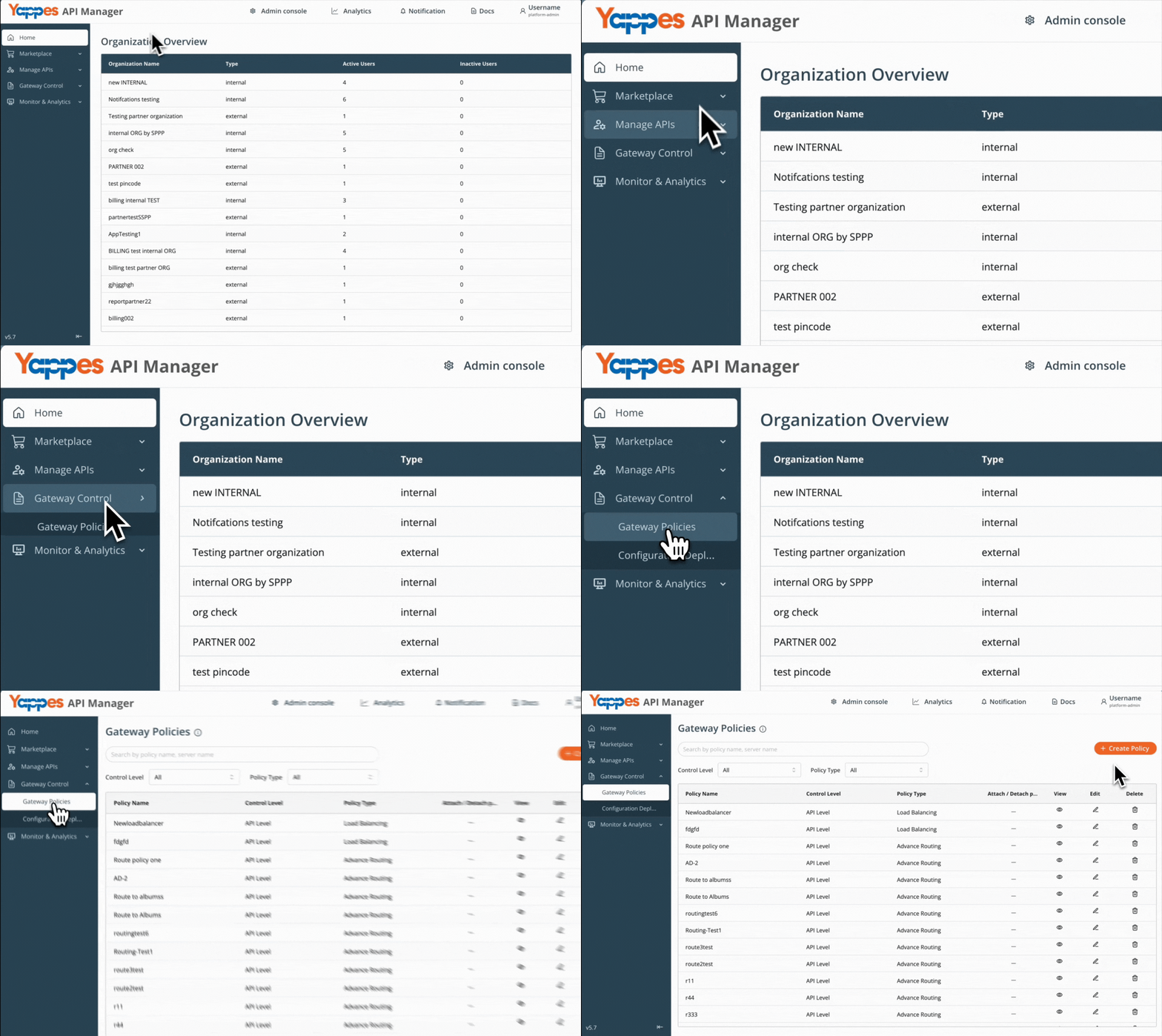
Step 2: Create a New Monetization Limit Check Policy
- Click
Create policyfrom the gateway page - Set the
Control LeveltoSubscription Level - In the
Policy Typedropdown, selectMonetization Limit Check
For general policy creation guidance, see Creating a policy (w/edit and delete).
Step 3: Set the Policy Name
- Enter a descriptive name in the
Policy Name*field (e.g.,prepaid_threshold_100) - Add a detailed description in the text area field to document the policy purpose
Step 4: Configure the Threshold
- In the
Monetization Limit Checksection, enterMinimum balance threshold limit* - Example:
100 - Optionally enable custom error and message for insufficient balance or configuration errors
Step 5: Save the Policy
- Review all entered information for accuracy
- Click the
Create Policybutton to create the policy - Wait for the confirmation message
Success
The Monetization Limit Check policy is successfully created.
Step 6: Navigate to Manage Subscriptions
- From the main navigation menu, click on
Manage Subscriptions - The
Manage Subscriptionspage will display a list of all API subscriptions - Locate the subscription(s) where you want to apply the Monetization Limit Check policy
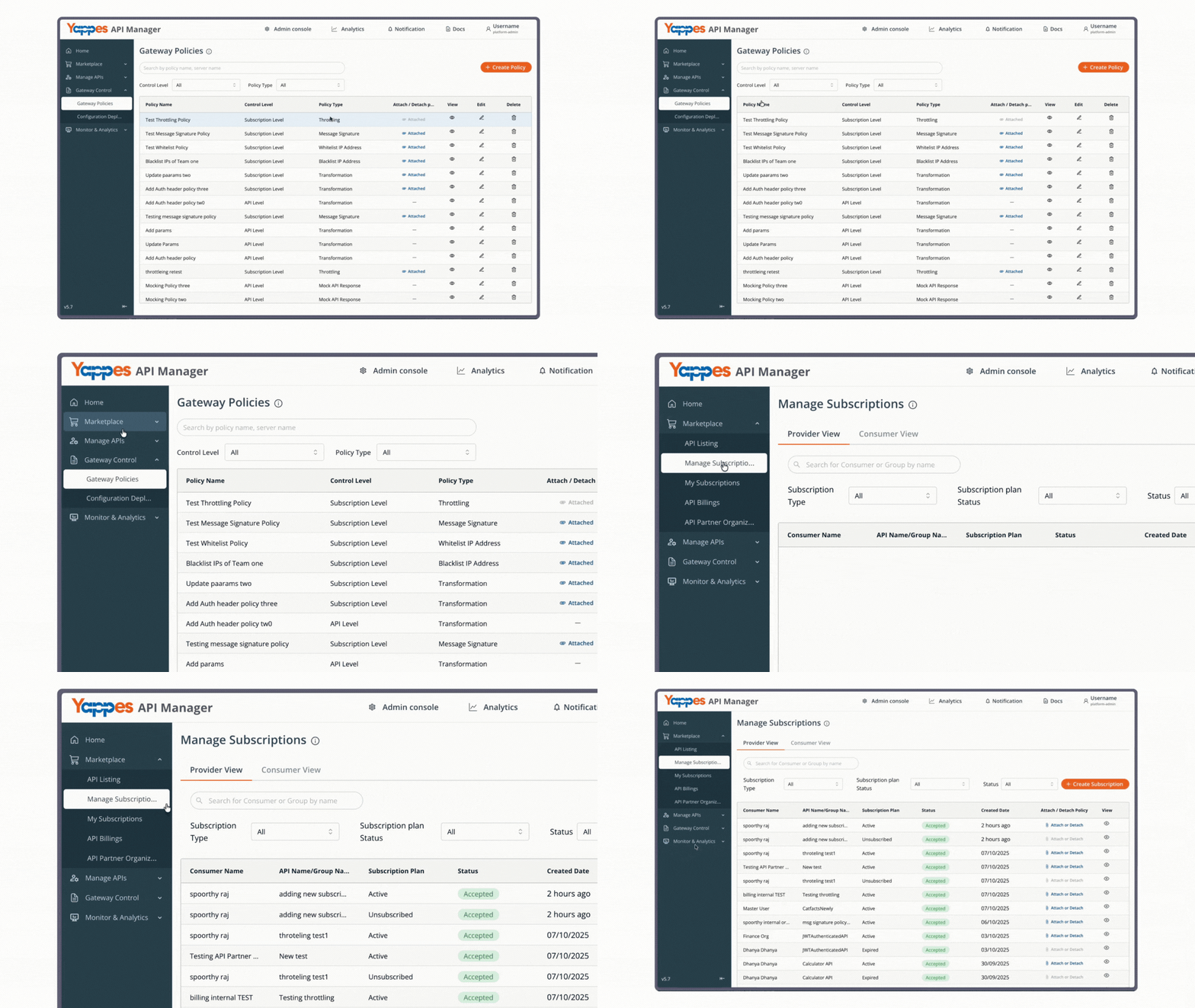
Step 7: Attach the Policy to Subscriptions
- Click the
Attach or Detachbutton for the relevant subscription - The policy attachment dialog will open
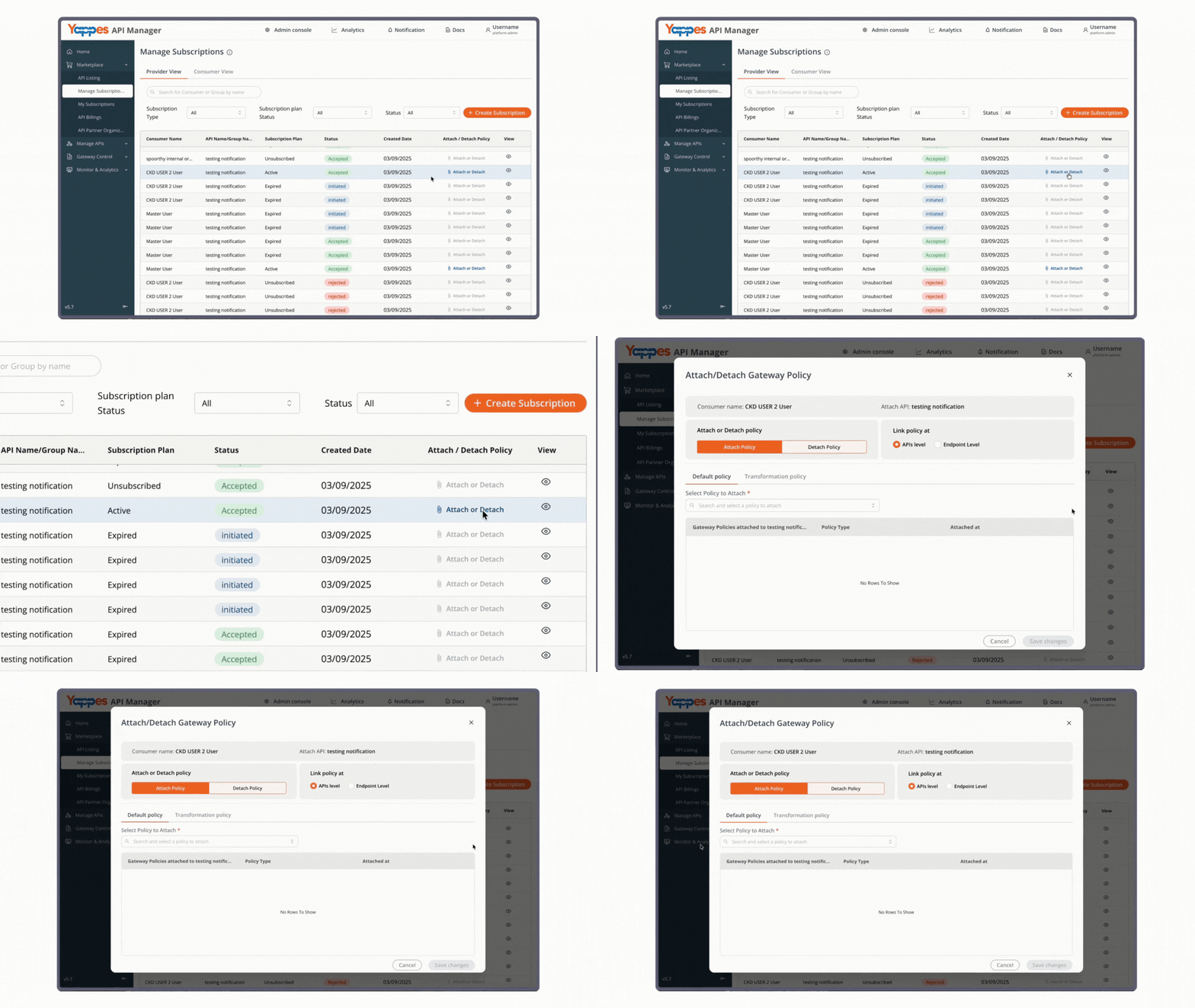
Step 8: Attach Policy to API or Endpoint
- In the
Select Policy to Attachdropdown field, choose your newly created Monetization Limit Check policy (e.g.,prepaid_threshold_100) - Choose the attachment level:
API Level: Applies the threshold to all endpoints of an APIEndpoint Level: Applies the threshold to specific endpoints only
- Click the
Attach Policybutton next to your selection
For general attach and detach steps, see Manage Subscriptions — Attach/Detach Gateway Policies.
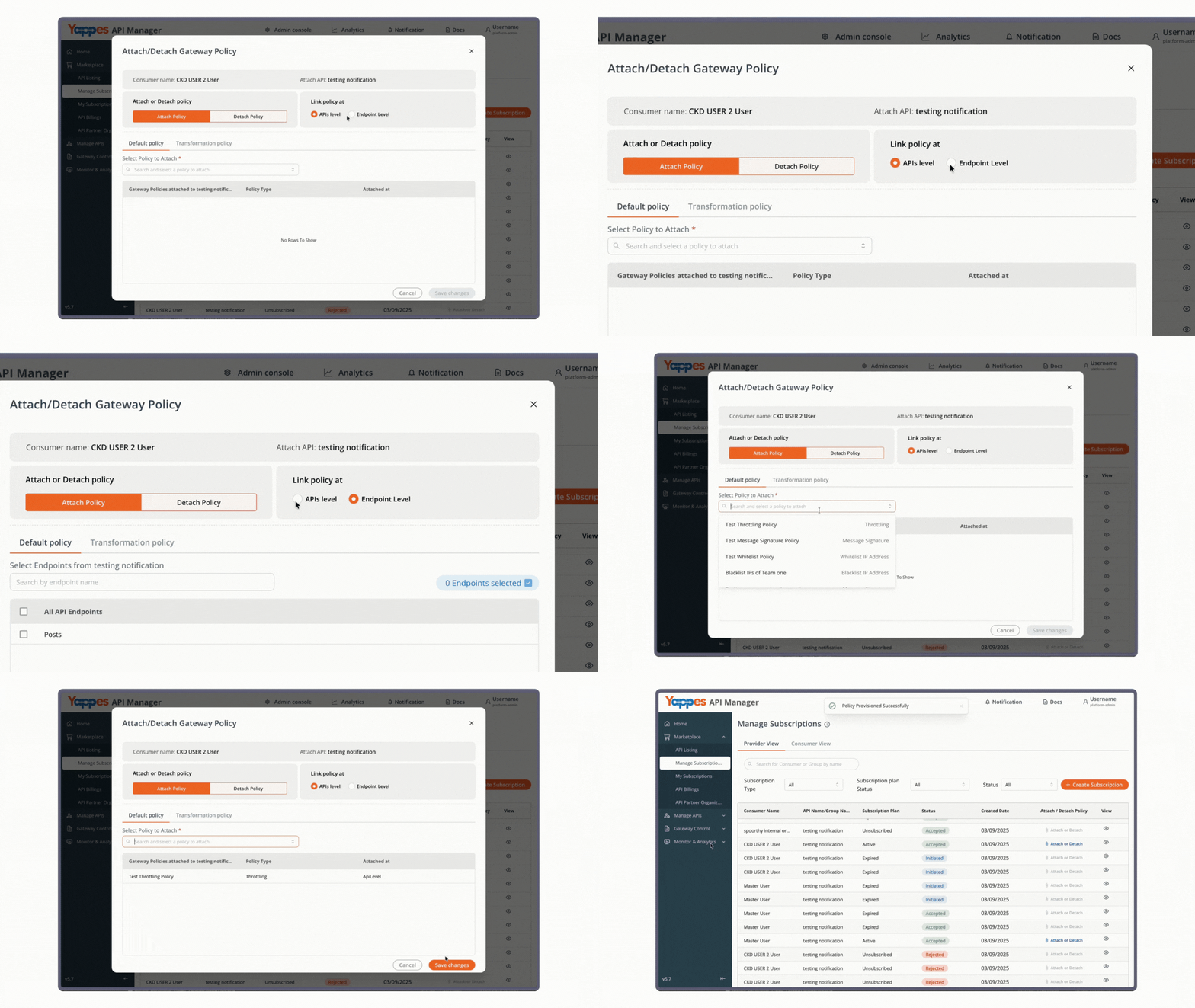
Step 9: Verify Policy Attachment
- Confirm that the policy appears in the attached policies list for the subscription
Threshold Configuration
Configuration Fields
| Field | Required | Description |
|---|---|---|
| Minimum balance threshold limit | Yes | Token balance at which subscription usage stops (thresholdValue). Must be a number greater than or equal to 0. |
Validation Rules
| Rule | Description |
|---|---|
| Control level | Subscription Level only |
| Threshold required | Minimum balance threshold limit cannot be empty |
| Numeric value | Value must be a number |
| Non-negative | Value must be greater than or equal to 0 |
Example Configuration
| Field | Example |
|---|---|
| Minimum balance threshold limit | 100 |
With this configuration, the gateway stops subscription usage when the prepaid wallet reaches 100 tokens.
Understanding the Interface
| Component | Description |
|---|---|
| Control Level | Required field that must be set to Subscription Level |
| Policy Name | Required unique identifier for your policy |
| Policy Type | Select Monetization Limit Check |
| Description | Optional field for documenting the policy purpose |
| Minimum balance threshold limit | Token balance at which prepaid usage stops |
| Custom error and message | Optional override of default HTTP status, error code, and message |
Relationship to Monetization Settings
If Monetization Limit Check is not attached to a subscription, the gateway uses the organization-wide Prepaid Threshold Limit (tokenThresholdLimit) from Admin Console Monetization → Settings. The default organization threshold is 0.
When the policy is attached, the policy thresholdValue takes precedence over the organization default for that subscription.
What Happens When the Threshold Is Reached
If Monetization Limit Check detects that the prepaid wallet has reached the minimum balance:
- The request is blocked at the API Gateway
- The backend service is not invoked for blocked requests
- The client receives an insufficient token balance error
- The failure is logged for monitoring and audit purposes
Default Errors
| HTTP Status | Error Code | Default Message |
|---|---|---|
429 |
INSUFFICIENT_TOKEN_BALANCE |
Insufficient token balance to process this request |
500 |
MONETIZATION_CONFIGURATION_ERROR |
Monetization Configuration Failed |
Verification and Testing
Confirming Policy Creation
- Navigate to the
Gateway Policiespage - Verify your policy appears in the list with the type Monetization Limit Check
- Check that the threshold matches your configuration
Testing Threshold Enforcement
- Attach the policy to a test subscription
- Make API requests while the prepaid wallet is above the threshold and confirm success
- Reduce the wallet to the configured threshold and confirm the gateway blocks further requests
- Confirm the default or custom error is returned for insufficient balance
Troubleshooting
| Issue | Possible Cause | Resolution |
|---|---|---|
| Cannot create the policy | Control Level is not Subscription Level |
Select Subscription Level — this policy is not available at API Level |
| Save fails on threshold field | Empty, non-numeric, or negative value | Enter a number greater than or equal to 0 |
| Policy not appearing in attachment list | Policy not saved, or wrong control level | Confirm the policy exists as Monetization Limit Check at Subscription Level, then refresh Manage Subscriptions |
| Requests blocked below expected usage | Threshold higher than remaining wallet balance | Lower Minimum balance threshold limit, or add tokens in My Wallet |
| Organization default still applying | Policy not attached to the subscription | Attach the policy via Manage Subscriptions |
| Unexpected configuration error | Monetization is not configured for the organization | Check Monetization Settings and retry |
Frequently Asked Questions
Is Monetization Limit Check available at API Level?
No. It is Subscription Level only. Create it in Gateway Policies, then attach it via Manage Subscriptions.
What happens if I do not attach this policy?
The gateway uses the organization-wide Prepaid Threshold Limit from Monetization Settings.
What is the difference between Monetization Limit Check and API Quota Check?
API Quota Check caps transactions per day, week, or month on a specific endpoint (API Level only). Monetization Limit Check stops prepaid usage when the wallet hits a token threshold (Subscription Level).
What is the difference between Monetization Limit Check and Throttling?
Throttling Policy limits request rate in a time window. Monetization Limit Check enforces prepaid token balance, not request rate.
Can I customize the error returned when the threshold is reached?
Yes. Enable custom error and message in the policy modal. See Custom Error and Message.
Pro Tip
Use Monetization Limit Check when a subscription needs a different prepaid cutoff than the organization default. Keep the organization threshold in Monetization Settings as a fallback, and pair with Throttling Policy or API Quota Check when you also need rate or period-based limits.