Billing Configurations
You can generate invoices for users who have subscribed to your API offerings on the API Manager. The billing cycle is the same for all subscribers and charges are based on API usage. Once the billing cycle completes, an invoice is generated for each consumer.
You can also set an invoice due date—the last date for users to pay subscription charges. If payment is not made by the due date, the user's subscription to the APIs may be canceled.
Path: Admin Console → Monetization → Billing Config
Open Monetization → Billing Config in the Admin Console sidebar.
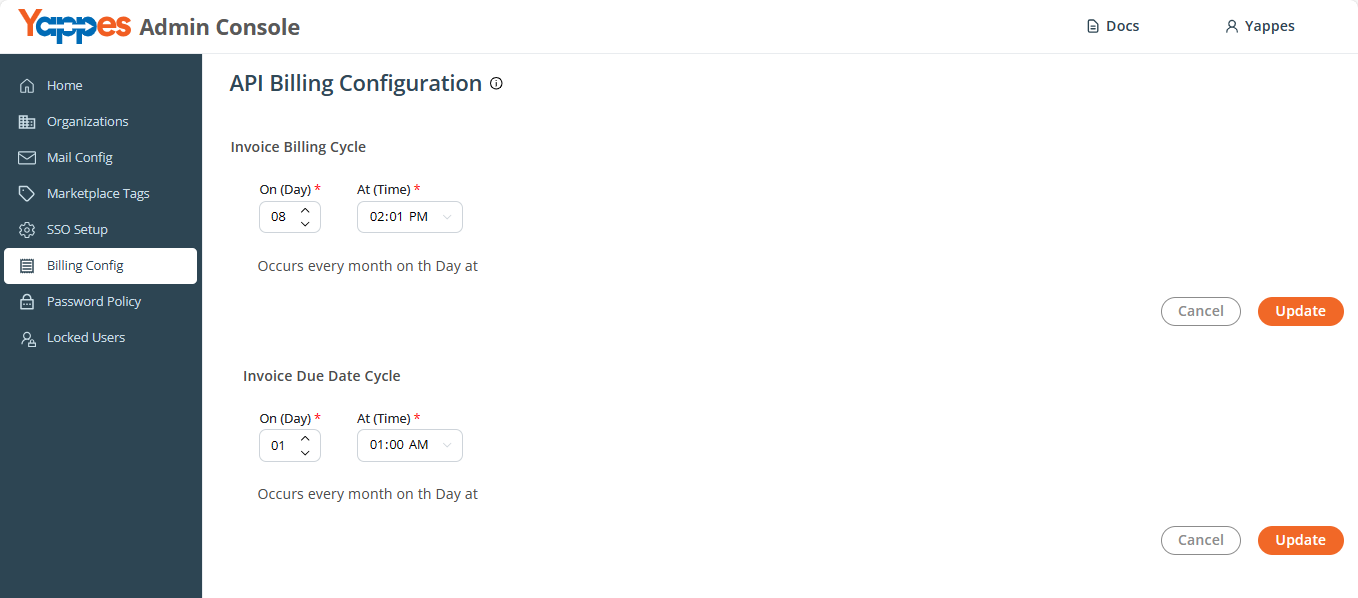
Overview
The API Billing Configuration page has two independent sections:
- Invoice Billing Cycle — when invoices are generated each month.
- Invoice Due Date Cycle — when payment is due for generated invoices.
Each section has its own Update button.
Invoice Billing Cycle
Controls when the platform generates monthly invoices for API usage.
| Field | Label | Description |
|---|---|---|
| Day | On (Day) | Day of month (DD picker) |
| Time | At (Time) | Time of day |
Summary text: Occurs every month on {day}th Day at {time}
Validation: Change day or time from current saved values before Update is accepted.
Step-by-Step
- Go to Monetization → Billing Config.
- Under Invoice Billing Cycle, set On (Day) and At (Time).
- Review the summary line.
- Click Update.
Invoice Due Date Cycle
Controls the due date for invoices generated in the billing cycle.
| Field | Label | Description |
|---|---|---|
| Day | On (Day) | Due day of month |
| Time | At (Time) | Due time |
Summary text: Occurs every month on {day}th Day at {time}
Step-by-Step
- Under Invoice Due Date Cycle, set On (Day) and At (Time).
- Click Update for this section.
Example
If the monthly billing cycle ends on the 28th of each month, an invoice is generated for each user based on usage that month. If the due date is the 10th of the following month, users must pay by that date to continue accessing APIs.
This billing system ensures accurate charges and a clear payment deadline.