Manage Organizations
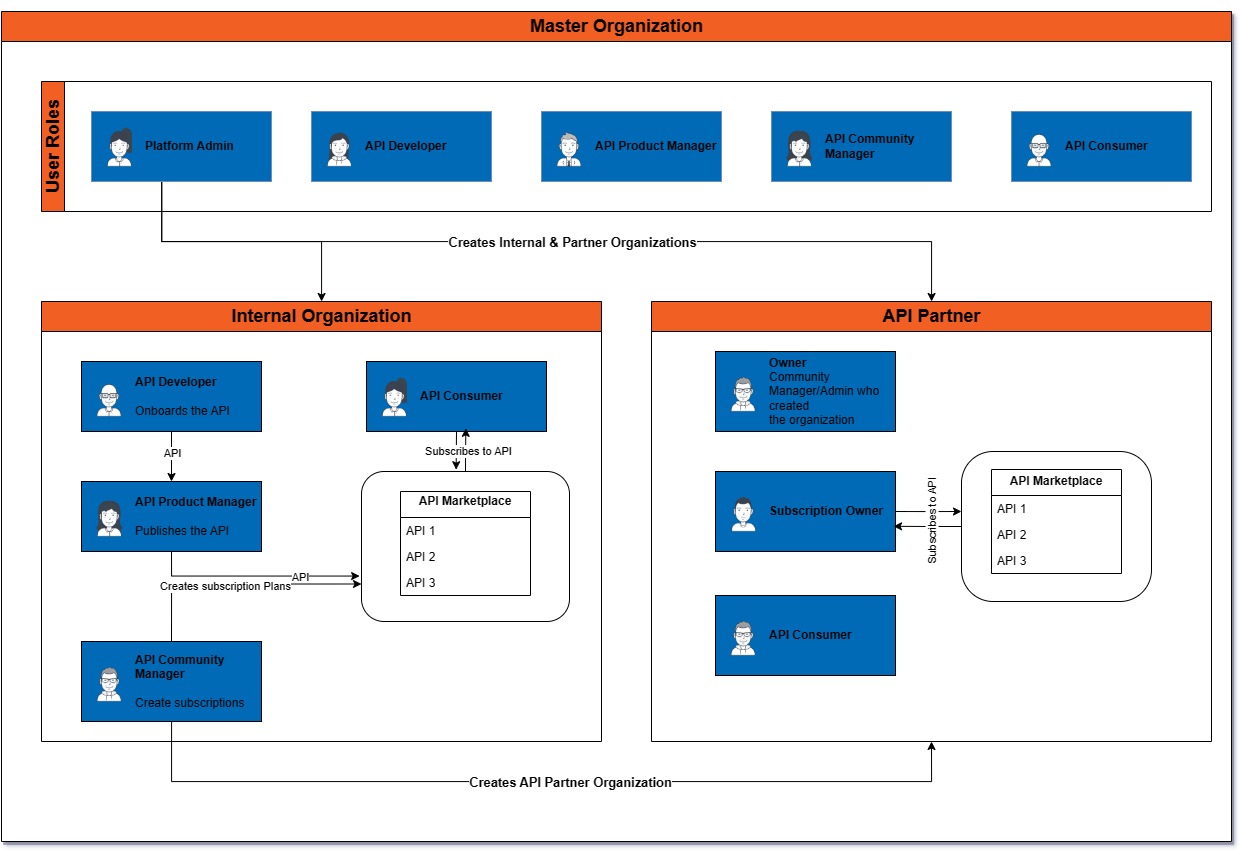
On Yappes, Organizations act as separate workspaces for integrating APIs and distributing them efficiently within a large organization. The key function of the Admin Console is to create new organizations, serving as the core of the platform, and enabling you to manage APIs at a large scale. By using organizations, you can invite users to integrate APIs, consume APIs, and distribute them among other organizations and users.
Why it is required
You need Organizations to provide space/resources for different kinds of APIs, as well as create a separate user-friendly environment for each organization in the API Manager. Whenever a new user/ the existing user onboard a new API, they know which organization's resources they need to use. If they are in a different organization, they'll switch to the appropriate one and onboard their API there.
For example, you have a Loan sub-organization. Now, if the user onboards a Personal_Loan API, they will do it in the Loan organization you have created. It will use the resources available in the Loan organization without affecting the resources of other organizations present on the platform.
In addition, it gives the admin an idea of how many organizations are on the platform and which organization includes how many APIs and users.
There are three types of organizations:
- Master Organization: This particular organization gets created during the deployment.
- Internal Organization: Internal workspaces for various API services.
- API Partner Organization: These are your API Consumers (Partners/Vendors).
Organization structure example
Here is an example of how a bank-based organization can create organizations that represent their API offerings.
flowchart TB
  subgraph Admin-console-orgs-structure
    direction TB
    subgraph Master_Organization
        direction RL
        Bank
    end
    subgraph Internal_Organizations
        direction TB
                 Loans_Org
           Insurance_Org
                 Accounts_Org
    end
    subgraph API_Partner_Organizations
        direction RL
                    FinTech_Org
    end
  end
  Master_Organization --APIs--> API_Partner_Organizations
  Internal_Organizations --APIs--> API_Partner_Organizations
  FinTech_Org --APIs--> FinTech_Corparation
Internal Organization
A bank offers various services to its customers, including loans, insurance, credit cards, etc. To manage these API offerings on the API Manager, the Platform admin can create an Internal Organization.
Platform admins can invite users, add them to their respective organizations, and assign roles. Each role has the appropriate level of access to the API Manager platform.
API Partner Organization
This organization setup is for when you are working with an external entity and want them to use your APIs. API partners have only a limited number of roles. To learn more about different roles, see Types of user-based roles.
For example, if a Fintech company wants to use the bank APIs to access their services, such as insurance or accounts, they can do so.
flowchart TB
  subgraph Organization-Structure
  direction TB
    subgraph Internal-Organizations
      direction TB
      subgraph Loans_Org
          direction TB
            API_Developer
            API_Product_Manager
            API_Community_Manager
      end
    end
    subgraph API-Partner-Organizations
      subgraph FinTech_Org
          direction TB
            Owner
            Subscription_Owner
            API_Consumer
      end
    end
  end
  Loans_Org --APIs--> FinTech_Org
Where to begin
Using the Organizations section, you can perform several tasks, and the following is appropriate to become familiar with all the options it offers.
- Create Organizations: Learn how to create both Internal and External Organizations.
- Manage Users: Learn more about user roles; invite new users or add existing ones; change user status and delete them.
- Ownership: Change ownership of the organization.
- Delete: Here, you will find steps to delete an organization.
Visit each of these and make the most of your Organizations.